


Driver Components
While a Driver Component is running, it will repeatedly set and get the values of other variables in the workflow until some condition is satisfied. The result is a feedback loop.
In the example below, while Component A is running, it causes Components B and C to run multiple times. This can be viewed either as Component A calls Components B and C as subroutines, or Component A encompasses Components B and C.
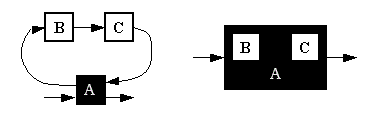
A Driver Component usually requires multiple iterations to execute. An example Driver Component is the Optimization Tool. The Optimization Tool has a set of design variables, constraints, and an objective as its variables. While the Optimization Tool is running, it will repeatedly set values for the design variables until the objective function is achieved.
Example uses of Driver Components include:
- Local optimization - The Optimization Tool can be used to repeatedly run a Component until some output is minimized, maximized, solved, or evaluated before executing the next Component in a series of Components.
- Convergence loops - The Converger Tool can also be used to close convergence loops. A convergence loop occurs when a workflow has an input that is some function of an output of the same model. By specifying an objective function that minimizes the difference between the input and output values, the Converger Tool can converge the system.
- Nested drivers - It is often the goal that an optimization is run on top of another driver, which is also calculating an output. For example, a Probabilistic Analysis Tool running a Monte Carlo calculates the mean and standard deviations for variables within a model. To minimize the results of the standard deviations of one or more of these variables, the PAT must be inserted as a Driver Component. In this way, an Optimization Tool can be run on the outputs of the PAT Driver Component.
Note: There is no inherent restriction to adding a Driver to a Process workflow, but the autorun feature that describes when a Driver runs is replaced by the structure of the model. All execution in a Process workflow is explicitly defined by work flow, and any Component in an active branch will run regardless of the state of the auto run property. This is also true for the Driver priority levels property.