


Options Dialog
The Options dialog allows you to configure the XML Plug-In to best suit the use case at hand. The XML Input Plug-In and XML Output Plug-In have different available options.
XML Input Plug-In Options
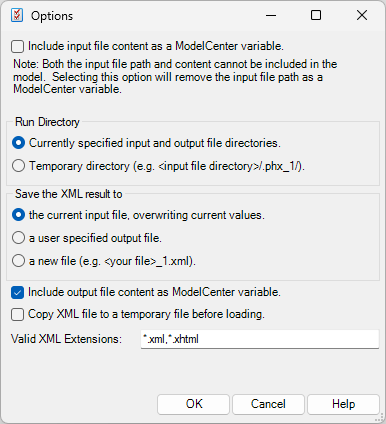
Include input file content as a ModelCenter variable -- If checked, the contents of the select input XML file are stored as a ModelCenter file variable. Values will be read from this stored data and not from the file on disk when the Plug-In is run.
Otherwise, the input XML file is stored as a string variable whose value is the full path to the file on disk. Values will be read from the file when the Plug-in is run.
Run Directory -- Choose one of the following:
- Currently specified input and output file directories -- When the plug-in is run, the input and output files are used directly, reading and writing in place.
- Temporary directory -- When the plug-in is run, the input file is copied to a temporary run sub-directory within the same directory as the currently loaded input file. The output file is written to the same temporary directory. The temporary directory will have a unique name begining with ".phx".
Save the XML result to... -- Choose one of the following:
- The current input file, overwriting current values -- The input file is modified in place, doubling as the output file.
- A user specified output file - Allows you to specify a location for the output file. The field for specifying the file is added to the XML Information pane on the main XML Plug-In interface.
- A new file - Generates a new file with a unique name in the same directory as the input file. The generated file will have the same name and extension as the input file, with a random number appended for uniqueness.
- Include output file content as ModelCenter variable -- If checked, a file variable is added to ModelCenter that contains the contents of the XML document that is generated when the plug-in is run.
- Copy XML file to a temporary file before loading -- If checked, the input XML file is copied to a temporary directory prior to the generation of the output file. The temporary file is automatically deleted when it is no longer needed.
- Valid XML Extensions -- The default XML file extensions to be used in the Select File dialog when choosing an XML file.
XML Output Plug-In Options
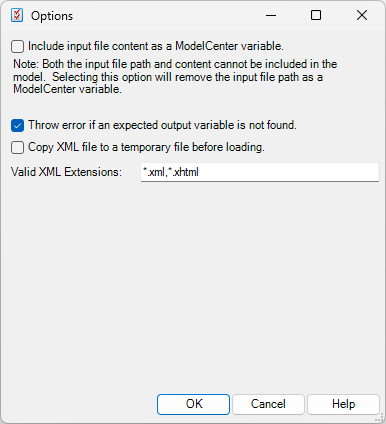
Include input file content as a ModelCenter variable -- If checked, the contents of the select input XML file are stored as a ModelCenter file variable. Values will be read from this stored data and not from the file on disk when the Plug-In is run.
Otherwise, the input XML file is stored as a string variable whose value is the full path to the file on disk. Values will be read from the file when the Plug-in is run.
- Throw error if an expected output variable is not found -- If checked, when the plug-in is run, an error will be thrown if a variable is expected from the XML document but is not found.
- Copy XML file to a temporary file before loading -- If checked, the input XML file is copied to a temporary directory prior to having its contents parsed into ModelCenter. The temporary file is automatically deleted when it is no longer needed.
- Valid XML Extensions -- The default XML file extensions to be used in the Select File dialog when choosing an XML file.