The data points for Float Functional Attributes may be specified in series or
gridded format. Values are stored to a maximum of 15 significant figures.
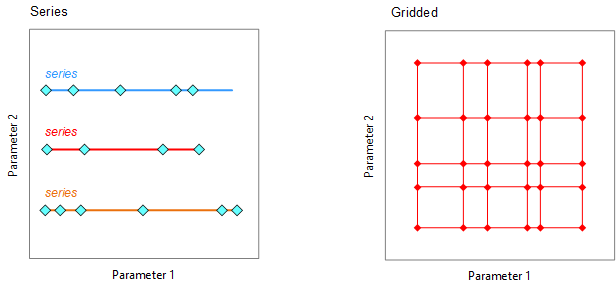
- Series functional data
-
Data points are specified in one or more series, where
only the parameter changes.
- Grid functional data
-
Data points are specified as a grid. All parameter values
are specified for each data point. This format is
suitable for data that is regular, complete, highly
curated, or where users need to be able to change
the x-axis, or do multi-dimensional interpolation in
Granta MI.
To edit Float Functional Data:
-
Open the datasheet of interest and click Edit this data on
the left of the Attribute name.
-
Data points should be edited in Microsoft Excel or another
spreadsheet application and pasted into the data field on
the Data
Points tab.
-
Select This graph is estimated to flag the graph data as
estimated, for example, where it was not possible to obtain
the data from authoritative sources.
- Optional:
Select the Not Applicable option if this Attribute is not
relevant for this record.
Note: This will remove all existing data when you click
Save.
-
Go to the Display Options tab to change the appearance
of the data graph.
Series data may be displayed as a table or a graph. For
graph display, you can specify the type of scale
used on the graph y-axis (logarithmic or not).
Gridded data may be displayed as a table or a graph. For
graph display, you can then specify the type of
scale used on the graph y-axis (logarithmic or not),
and whether to show lines, markers, or both on the
graph. You can also choose the x-axis parameter.
-
Go to the Parameters tab to specify the interpolation
type, scale type and default value for each of the
parameters used to evaluate the data.
For each parameter, you can specify the
- Interpolation type
(Automatic, None, Cubic Spline, or Linear),
- Scale type (Default, Linear, or Log),
- Default value.
The 'Automatic/Default' setting means that the default
setting from the Attribute definition is used. These
settings apply to the data for this Attribute in
this record only.
- Optional:
You may be able to add metadata about the data value, such as statistical
information or notes about the source of the data.
- Optional:
You can add information about any changes that you make on the
Notes tab.
-
Click Save to save all your changes.


