


Exercise 14: Advanced selection with Find Similar and Limit Stage
Find similar materials to your record, and then filter additonal attributes to identify materials which have the required properties for your design requirements.
 Find Similar is only enabled in the advanced Level 3
databases. This exercise assumes you are using the Level 3 Polymer database
from the last exercise.
Find Similar is only enabled in the advanced Level 3
databases. This exercise assumes you are using the Level 3 Polymer database
from the last exercise.- Open the record for Polypropylene (Copolymer, Conductive, 5% Carbon powder)
- Find records similar to it
-
Click Find Similar at the top
of the datasheet tab. Polypropylene (Copolymer, Conductive, 5% Carbon
powder) will become the Reference record.
- Use the default weightings to calculate nearness - do not open Nearness Settings.
-
Click
-
Compare the current material with the nearest alternative
-
Select one of the closest records from the list of results, PP
(copolymer, 10% talc), and open a comparison table by clicking
Comparison...
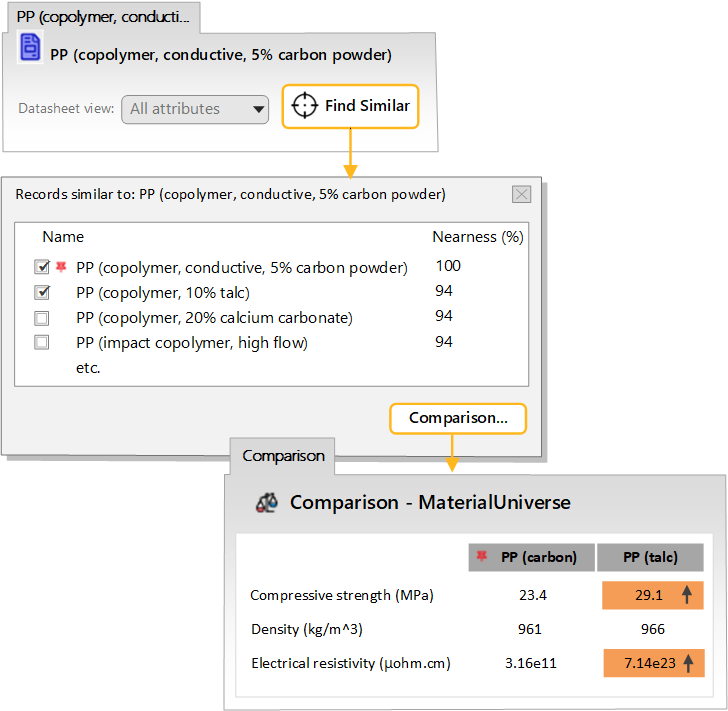
The Comparison Table is highlighted where there is a difference between the original (reference) and alternative materials. The nearest materials in the results have similar physical properties to the reference material (density, yield strength, Young’s modulus). However, the original material may have been chosen for its other characteristics. In this case, the polymer is conductive (has a low electrical resistivity).
To find materials which have all the properties we need, we can proceed in one of two ways:
- Adjust the Nearness Settings to prioritise the material properties most important to our application (see Exercise 15).
- Use the results from Find Similar as the basis of a Selection Project. In this case, you can use a Limit Stage to filter on the additional requirement for conductivity.
-
Select one of the closest records from the list of results, PP
(copolymer, 10% talc), and open a comparison table by clicking
Comparison...
-
Create a Selection Project using the results
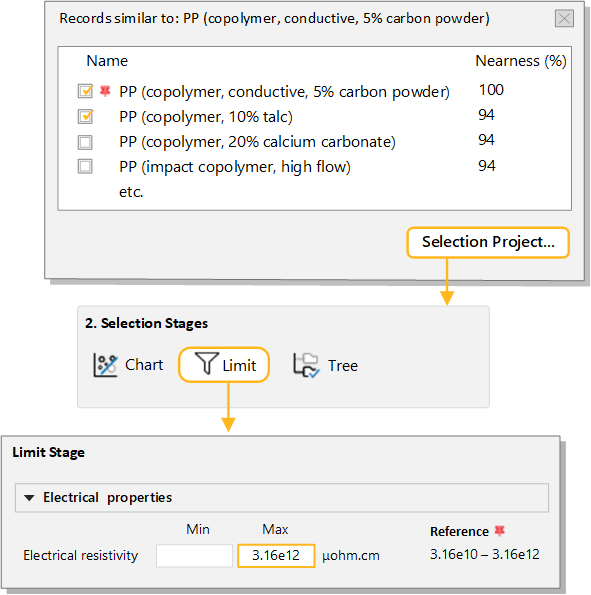
- In the Records similar to dialog, click Selection Project. The results are loaded into a new project, ranked by nearness.
-
Filter the results for an Electrical resistivity that is equal to or
lower than that of the reference material
-
Create a Limit Stage, and set the maximum value
for Electrical resistivity to
3.16e12, which is the maximum value for the
reference record. Apply the stage.
Example results, with Nearness (%):
- PP (10-12%, stainless steel fiber) - 86%
- PP (10% carbon fiber) - 82%
- ABS (40% aluminum flake) - 81%
-
Create a Limit Stage, and set the maximum value
for Electrical resistivity to
3.16e12, which is the maximum value for the
reference record. Apply the stage.
- Delete this stage.