Using Markdown text formatting
Markdown syntax can be used to format text data in Granta MI, for example in Long Text Attributes such as notes and descriptions.
Emphasis
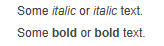
Italic: single asterisk ( * ) or single
underscore ( _ ) on each side of the text.
Bold: two asterisks (
** ) or two underscores ( __ ) on each side of the
text.
Example:
Some *italic* or _italic_ text.
Some **bold** or __bold__ text.
Links
[link text](http://url.com "Title")"Title" is optional and specifies the text displayed when the mouse is moved over the link text.
Example:
A link to my [website](http://my.server.name.com/ "MY website")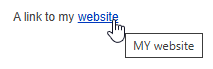
Images
[alt
            text]
and "Title" are optional.
[alt text]specifies text to be displayed instead of the specified image when the image is not available."Title"specifies the text displayed when the mouse is moved over the image.
Example:

Linked images
[](http://url.com)To link an image, place square brackets around the image code, and then place the link URL in round brackets immediately after it.
Example:
[](https://ansys.com)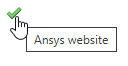
Code
Single backtick ( ` ) quote on each side
of the text.
Example:
Type this: `Domain\Group`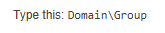
Superscript
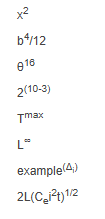
Single caret ^ character on each side of the text,
for example: ^x^
The scripted text cannot include spaces.
Example:
x^2^
b^4^/12
θ^16^
2^(10-3)^
T^max^
L^∞^
example^(Δ~i~)^
2L(C~e~i^2^t)^1/2^
Subscript
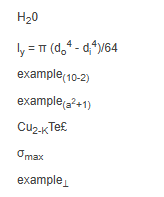
Single tilde (swung dash) ~ character on
each side of the text, for example: ~x~
The scripted text cannot include spaces.
Example:
H~2~0
l~y~ = π (d~o~^4^ - d~i~^4^)/64
example~(10-2)~
example~(a^2^+1)~
Cu~2-K~Te£
σ~max~
example~⊥~
Headers
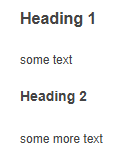
Top-level heading: three or more consecutive equals (
=== ) characters on a line.
Second-level heading: three or more
consecutive hyphens ( --- ) on a
line.
Example:
Heading 1
===
some text
Heading 2
---
some more text
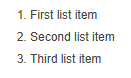
Lists, ordered
Line starting with any number followed by a period
(.), followed by a space. For
example:
6. First list item
11. Second list item
1. Third list item
Lists, unordered
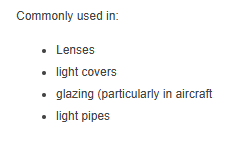
Line starting with an asterisk followed by a space (first list item must be preceded by a blank line). For example:
Commonly used in:

* Lenses
* light covers
* glazing (particularly in aircraft
* light pipes
Horizontal rule
Three or more asterisks ( ***
), or underscores ( ___ ) on a line by themselves. For
example:
some text
***
some more text
___

Backslash escapes
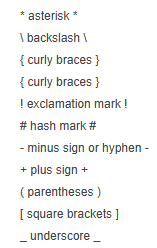
Use a backslash escape to generate literal characters which would otherwise have special meaning in Markdown’s formatting syntax.
Examples:
\* asterisk \*
\\ backslash \\
\{ curly braces \}
\{ curly braces \}
\! exclamation mark \!
\# hash mark \#
\- minus sign or hyphen \-
\+ plus sign \+
\( parentheses \)
\[ square brackets \]
\_ underscore \_