Editing Short Text data
Short Text Attributes are typically used for names or very short descriptions, for example, Project code or Common Name. They can be up to 255 characters long.
Short Text Attributes may be configured to enforce constraints on the data that you can enter:
- Uniqueness. Short Text Attributes used for storing values that must be unique, for example, an ID, may be configured to prevent duplicate values from being entered. Where an Attribute has a uniqueness constraint applied to it, MI Viewer will check to see if the value you entered is already being used in another record.
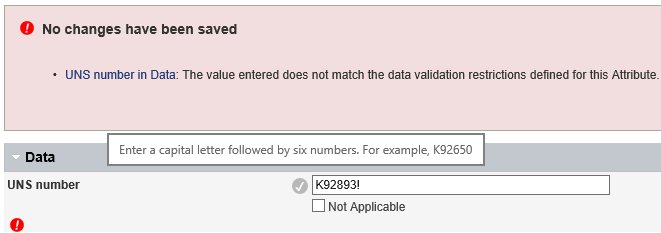
- Data validation. Data validation rules are used to ensure that text data is
always entered in the required format, for example, standard codes such as EN numbers
and CAS numbers, or internal project codes. Attributes that have data validation
restrictions are identified in MI Viewer datasheets with a check
 symbol in front of the data value
field. You can mouse over this symbol to see a description of the required format
provided by your MI Data Administrator.
symbol in front of the data value
field. You can mouse over this symbol to see a description of the required format
provided by your MI Data Administrator. 
To edit Short Text data:
-
Open the datasheet of interest and click Edit this data
 on the left of the Attribute name.
-
Click Save to save all your changes.
For Attributes that have data validation restrictions specified, validation is performed on saving changes to the value. If the validation fails because the data entered is not in the required format, you cannot save your edits.