Records
A record in Granta Selector can either be a 'folder record', a 'data record', or a combination of the two (a 'generic' record).
The records in a Granta database are organized into a hierarchical tree structure. Data records with similar attributes are grouped together under folders. These folders, which may themselves have attributes, are similarly grouped together into other folders. Individual data records are the 'leaves' of the tree, and folders are the branches. Part of the identifier tree can be seen in figure 1 of the Architecture topic.
Folder Records
A folder record  acts as a branch of the tree. It does not have any data associated with it, but does
have records 'below' it in the tree.
acts as a branch of the tree. It does not have any data associated with it, but does
have records 'below' it in the tree.
Data Records
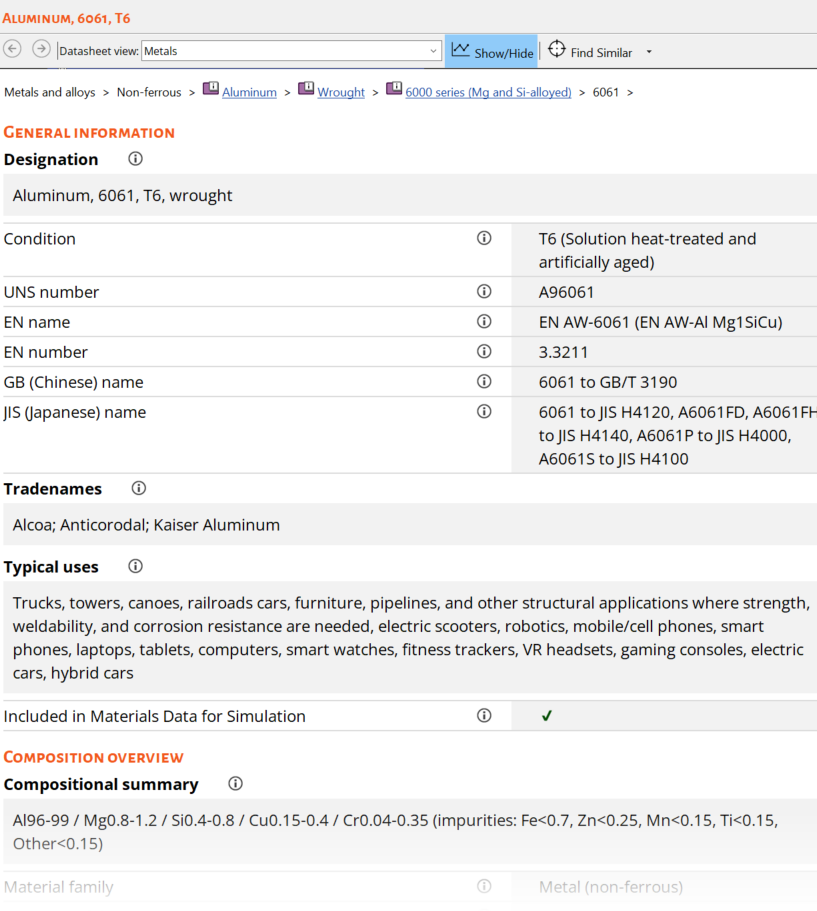
Each data record in the database represents an entity - a material, a process, a supplier, etc. Each has a set of attributes. For a MaterialUniverse™ record, these attributes include its composition, strength, density etc. For a ProcessUniverse record, the attributes include the surface finish, tolerance, economic batch size etc. For a supplier, the attributes are the Company name, address, telephone number, etc.
There are two types of data record:
A 'specific' data
record  is a
'data' record that is not also a 'folder' record. It can not be subdivided, and usually
represents a 'real' entity (e.g. Aluminum alloy 2014-T4).
is a
'data' record that is not also a 'folder' record. It can not be subdivided, and usually
represents a 'real' entity (e.g. Aluminum alloy 2014-T4).
A 'generic' data record
 is a record
that is both a 'folder' and a 'data' record. Its attributes span the range of attributes
of the 'specific' records beneath it in the tree - that is, it is a 'fictitious' entity
whose attributes are an envelope around the attributes of the records below it in the
tree. Generic records are particularly useful during the early stages of the selection,
where breadth of information, and not detail is important. They are also useful as part
of the data validation process - it can be expected that the attributes of the records
beneath a generic record will be within the envelope of attributes covered by the
generic.
is a record
that is both a 'folder' and a 'data' record. Its attributes span the range of attributes
of the 'specific' records beneath it in the tree - that is, it is a 'fictitious' entity
whose attributes are an envelope around the attributes of the records below it in the
tree. Generic records are particularly useful during the early stages of the selection,
where breadth of information, and not detail is important. They are also useful as part
of the data validation process - it can be expected that the attributes of the records
beneath a generic record will be within the envelope of attributes covered by the
generic.
In Granta Selector, the attributes of a record can be viewed in the Datasheet window.