


Architecture of Granta databases
Granta materials information is stored in databases, which contain data tables and record subsets. Records are stored in a tree structure within a table, and each material record has a number of attributes.
Database
In Granta Selector, a database consists of one or more tables (datasets) which are linked together.
The core Granta Selector database has six linked tables. The main selection tables contain materials and manufacturing processes. The supporting tables contain information about producers and references (the sources of information that were used to compile the main tables).
Tables
A Table is a compilation of information relevant to a single type of entities (records). For example, it may contain materials and their properties, or manufacturing processes. A Table can be thought of as one page of a spreadsheet: with records (for example, materials) in each row and a set of attributes (sometimes called properties, or 'fields') in the columns.
Each Table in the current database is represented by an entry in the Table list at the top of the Browse window in Granta Selector (Figure 1, below). The records in each Table are arranged into a hierarchical 'classification tree' structure. Data records with similar attributes are grouped together under folders. These folders, which may themselves have attributes, are similarly grouped together into other folders. Individual data records are the 'leaves' of the tree, and folders are the branches.
Figure 1. Example of a Table in Granta Selector.
Granta Selector can only perform selections on one table at a time - for example MaterialUniverse™ or ProcessUniverse. This table is called the Selection Table. The Selection Table is set for the current Granta Selector 'Project'.
Record Subset
A Record Subset specifies a subset of records in a Table.
A set of pre-defined subsets is available for each table, and is available in a list box wherever the record subset can be changed.
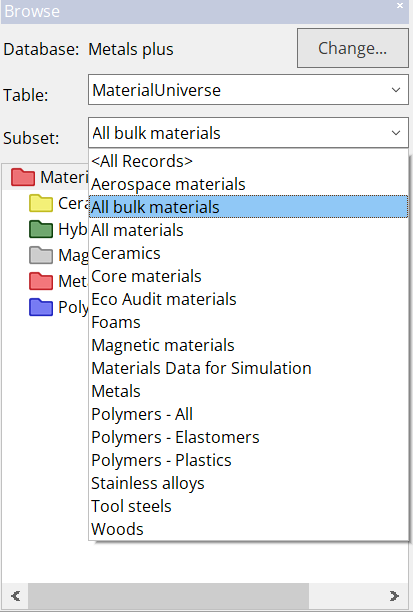
In Granta Selector, the record subset for the Selection Table determines which records are available for selection. The setting can be viewed and changed in the Selection Data pane of a Selection Project.
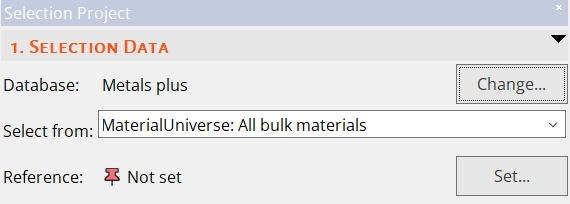
The record subset is also known as the record filter.
Attribute layout
The Attribute Layout for the Selection Table determines the attributes that are available for selection purposes. A layout also specifies the attributes that are visible, and their layout in the Datasheet window.
Some attributes are relevant to all entities in the table, others are specific to a particular class of entities. For example 'Density' is a relevant attribute for all material records, whereas 'Water Absorption' is only relevant for a particular class of materials – Polymers. The 'All Bulk Materials' attribute layout, (relevant for all classes of materials), contains Density, but not Water Absorption. The 'Polymers' attribute layout contains both Density and Water Absorption.
Following the example above, it is only possible to use 'Water Absorption' as a criterion for a materials selection if the attribute layout for the selection table is set to Polymers.
A set of pre-defined attribute layouts is available for each table, and is available in a list box wherever the attribute layout setting can be changed.
The attribute layout is also known as the attribute form.