


Access control information in datasheets
In databases with permission-based access control, the current access control settings for a record and its data may be viewed on its datasheet.
Visibility of access control information on a datasheet depends on:
- Whether or not you have privileges to view the record and its data
- Whether or not the Layout you are using has been configured to show access control information.
If you have privileges to view the record and its data, and the Layout is configured suitably, a summary of the read permissions applying to the record for each access control role are shown under an Access Control heading at the top of the datasheet, for example:
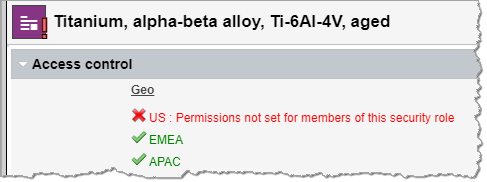
 indicates that
members of this role have read permission for the record
indicates that
members of this role have read permission for the record
 indicates that
members of this role do not have read permission for this record
indicates that
members of this role do not have read permission for this record
Messages providing information about the different permissions configured in a database may be provided by your Granta MI administrator. A red exclamation point is used on datasheets and in the Contents tree to identify items for which a message has been specified, for example:
 on a table
 on a folder
 on a record