
Drawing Vias
To draw a via:
- Select the padstack on which you want to draw the via.
-
Click Home. From the Draw Geometry box, click the Drop Via icon
(
 ).
).
- Click the location where you want to draw the via.
A via is placed at the specified location.
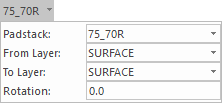
Alternately, use the Via Settings drop-down menu on the Home tab to make changes to the via's padstack, layers, and rotation.
You can also simplify how the via is displayed.