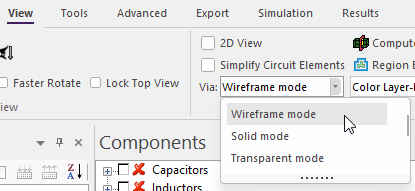
Via Rendering Modes
Vias can be displayed in three modes: Wireframe, Solid, and Transparent. These options balance visualization clarity with graphics performance.
Modes
- Wireframe
- Vias are drawn as outlines only. This mode accelerates loading and reduces GPU memory usage. Best for quick inspection and large or complex boards.
- Solid
- Vias are shown as opaque 3D solids, providing a clear, physical representation.
- Transparent
- Vias are rendered as semi-transparent solids, allowing users to see both the via volumes and surrounding geometry.
Changing Via Rendering Mode:
- Click View.
- From the Via Rendering Mode drop-down menu, select Wireframe, Solid, or Transparent.