
Initial Meshing Method
HFSS 3D Layout designs have four meshers, and five choices, available to generate the initial mesh (i.e., Auto, Phi, Phi Plus, Classic, and Tau).
The Auto selection automatically chooses a suitable mesh method for the design based on geometry characteristics (e.g., if the design contains bondwires, Phi Plus is selected. If the Tau mesher beta feature is active, Tau may be selected if the geometry contains large planar facets or small gaps.).
The Phi and Phi Plus meshers are advanced layout-based meshing technologies that can produce meshes rapidly and generate fast and accurate results. The Phi mesher is a special-purpose fast mesher designed for purely layered structures. In contrast, Phi Plus works with all types of layout models, particularly those containing bondwires, solder balls, or 3D Components (MCAD).
The Classic mesher uses a Bowyer algorithm to create compact meshes for the model with very large length scales. It represents the model very accurately.
The Tau mesher is a geometry-based meshing engine designed for curved surfaces and complex structures. It remeshes select curve faces using surface mesh routines and couples them with faceting triangles to ensure a tight, conformal mesh. Tau is preferred for designs with mixed-scale features, large planar facets, or IE Regions requiring high-quality surface mesh. Tau can only be applied to MCAD components. It will not function if the design has ECAD layout geometry.
The Tau mesher is a beta feature specifically for use within a Mesh Fusion framework, a hybrid meshing technology that combines tetrahedral and prism-based elements to support mixed-solver workflows. Refer to Mesh Setup for Mesh Fusion/Assembly and/or Mesh Fusion/Assembly for Hierarchical Design.
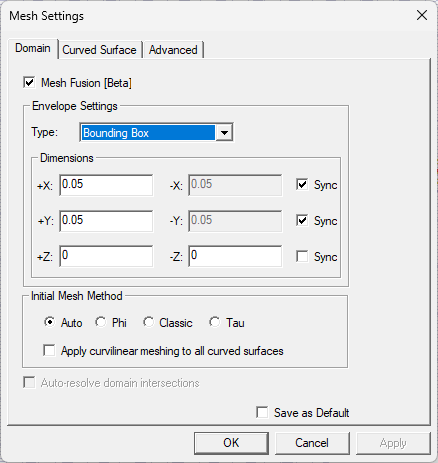
Access the Mesh Settings Window
To choose an initial meshing method, access the Mesh Settings window by completing these steps.
-
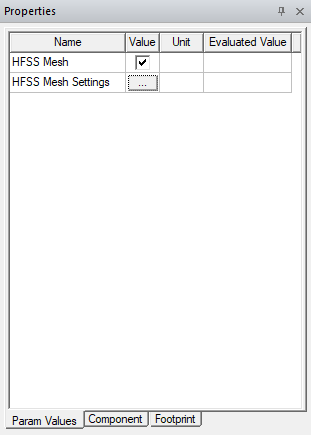
From the Layout Editor, select the active design to make its parameters appear in the Properties window.
-
If applicable, click on the Param Values tab in the Properties window. Then click the HFSS Mesher Settings button to open the Mesh Settings window.
-
Choose one of the following meshers available in the Initial Mesh Method area:
- Auto — automatically selects a suitable mesh method for the design based on geometry characteristics (e.g., if the design contains bondwires, Phi Plus is selected).
- Phi — a layout-based meshing technology, available in the HFSS 3D Layout interface. This advanced meshing technology is capable of rapidly generating an initial mesh ensuring faster simulations that can be further accelerated and enhanced by using high performance computing.
- Phi Plus — works with all types of layout models, particularly those containing bondwires, solder balls, or 3D Components (MCAD). Phi Plus generates an initial mesh using high performance computing (HPC).
- Classic — uses a Bowyer algorithm to create compact meshes for the model with very large length scales. It represents the model very accurately.
- Tau — a geometry-based meshing engine designed mesh fusion assemblies.
-
Click Apply.
-
Click OK to close the Mesh Settings window.
The procedure is complete.