
Meshing Method
HFSS
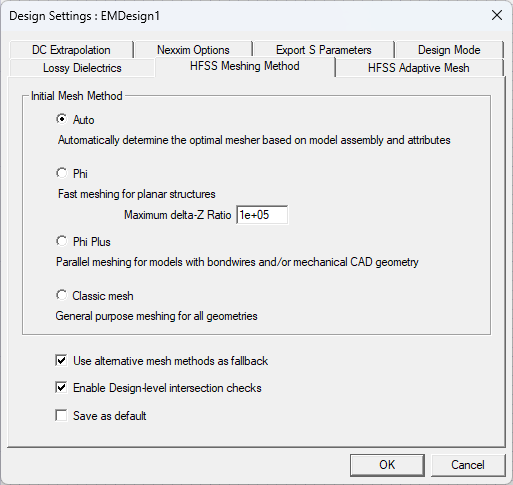
The Auto selection automatically chooses a suitable mesh method for the design based on geometry characteristics (e.g., if the design contains bondwires, Phi Plus is selected).
Phi
Classic
Select Phi mesh, Phi Plus, or Classic mesh as desired. If Use alternative mesh methods as fallback is checked, HFSS 3D Layout uses the selected mesher, if possible, but attempts to use the other meshers if they are more appropriate, based on analysis of the geometry. Depending on the model, Classic mesh may converge using fewer resources whereas Phi or Phi Plus may converge faster. Ansys recommends selecting Auto since HFSS 3D Layout automatically determines the correct choice of the mesher for a given geometry.
Meshing With Rigid-Flex Bends
Adding rigid-flex bends to circuit board designs allows users to reshape the design geometry to simulate realistic mechanical behavior and electrical connectivity. When a design is meshed in a bent state, user-selected meshing methods are overridden (i.e., selections made from the Design Settings window > HFSS Meshing Method tab). This ensures compatibility between meshing and the deformation imposed by rigid-flex bends.
Meshing selection with active rigid-flex bends is determined as follows:
-
If the design is Phi-suitable in flat (i.e., unbent) state, it will always be meshed using the Omega mesher when the rigid-flex bend is active (i.e., bent) state. The Omega mesher is available only when the designis completely planar, contains no 3D components, and in a bent state.
-
If the model contains any 3D geometry or bondwires, and for all other selections or inclusions, the Classic mesher is applied automatically.