
The Geometry Simplification Settings Window (IC Mode Only)
IC mode allows users many unique ways to simplify geometry simulations. Refer to the following instructions to open the Geometry Simplification Settings window and configure geometry parameters.
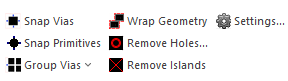
Opening the Geometry Simplification Settings Window
To open the Geometry Simplification Settings window, navigate to the Layout tab and select Settings.
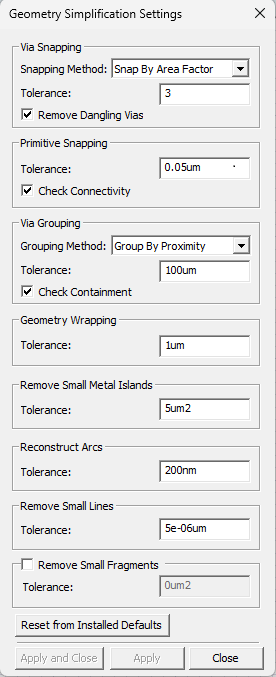
From the Geometry Simplification Settings window, users can adjust the following settings.
Via Snapping
-
Select a Snapping Method from the drop-down menu (Snap By Area Factor selected by default).
- Snap By Area Factor - Via groups are snapped by a maximum area equal to the Tolerance times the surface area of the via group being snapped.
- Snap By Distance - Via groups are snapped by a maximum distance of the Tolerance.
- Enter a value in the Tolerance field (e.g., 3).
- Check the Remove Dangling Vias box to delete vias that have no connectivity or have connectivity only to a single layer (checked by default).
Primitive Snapping
-
Enter a value in the Tolerance field, including the unit of measurement (e.g., 0.05um).
- Check the Check Connectivity box to ensure snapping does not violate the connectivity of the original objects (checked by default).
Via Grouping
-
Select a Grouping Method from the drop-down menu (Group By Proximity selected by default).
-
Group By Density - Uses hierarchical density-based spatial clustering to identify vias that form dense regions. This method provides superior detection of complex via patterns and automatically identifies clusters of varying shapes and sizes while handling noise and outliers.
-
Group By Proximity - Groups vias that are spaced similarly. Vias are not grouped if the distance between them exceeds the specified Tolerance.
- Group By Range - Groups vias based on whether a potential member is separated by no more than the specified Tolerance from any other member.
-
- Enter a value in the Tolerance field, including the unit of measurement (e.g., 100um). This represents the gap distance (i.e., maximum inter-via distance for clustering).
- Check the Check Containment box to detect and prevent electrical shorts (checked by default).Note:
Check Containment analyzes the placement of via primitives. When the possibility of a short is detected, Check Containment splits the group to prevent a short.
Geometry Wrapping
Enter a value in the Tolerance field (e.g., 1um).
Remove Small Metal Islands
Enter a value in the Tolerance field (e.g., 5 um2).
Reconstruct Arcs
Enter a value in the Tolerance field (e.g., 200nm).
Remove Small Lines
Enter a value in the Tolerance field (e.g., 5e-06um).
Remove Small Fragments
- Check the Remove Small Fragments box to enable the feature.
- Enter a value in the Tolerance field (e.g., 0um2).