
Reconstructing Arcs in IC Mode
Imported designs may contain arcs that have been approximated as many small line segments. These segmented arcs increase geometric complexity and can negatively affect simulation performance. Users can clean up a design by using the Reconstruct Arcs feature. Arcs are reconstructed when the segmented geometry meets the user‑specified Tolerance threshold.
Complete steps in the following subsections to configure Reconstruct Arcs, then reconstruct arcs within a design.
Configuring Reconstruct Arcs Settings
-
From the Layout ribbon, click Settings.
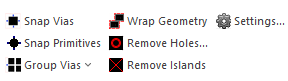
The Geometry Simplification Settings window opens.
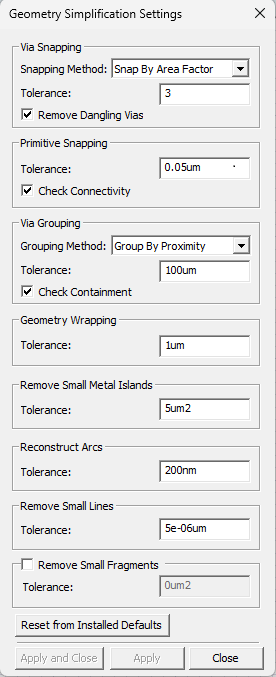
- From the Reconstruct Arcs area, enter a value in the Tolerance field (e.g., 0.5um). This value represents the minimum segmentation threshold at which an arc will be reconstructed.
- Click Apply and Close.
Reconstructing Arcs in the Layout Editor
-
Select the appropriate elements of the design.
-
Do one of the following:
-
From the Layout ribbon, click Reconstruct Arcs.
-
Right-click within the Layout Editor and select Reconstruct Arcs.
The selected segmented arcs are compared to the value in the Tolerance field. Any arc whose segmentation falls within the set Tolerance is reconstructed into a smooth arc.
For other instructions on the usage of the Layout Editor, keyboard commands, and simple tasks like converting polygons to circles, refer to Getting Started with Ansys Electronics Desktop.