
File Link Dialog Box
Use the file link dialog box is used to link data files for components generated in external applications such as the Ansys Mechanical .spm file shown in the following example. The dialog box name shown in its title bar varies to correspond with the coupling source type.
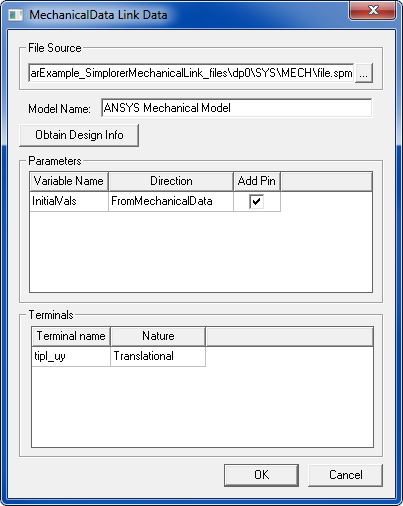
Click  to open a file selection window for locating and selecting the desired
File Source. You can assign a unique
Model Name to the model and component
being created. Click Obtain Design Info
to retrieve design information for the chosen source file. The Parameters and Terminals
panels display information about the parameters and terminals for the
model being created. Select Add Pin
to add a pin for the associated parameter to the new component.
to open a file selection window for locating and selecting the desired
File Source. You can assign a unique
Model Name to the model and component
being created. Click Obtain Design Info
to retrieve design information for the chosen source file. The Parameters and Terminals
panels display information about the parameters and terminals for the
model being created. Select Add Pin
to add a pin for the associated parameter to the new component.