
Exporting a Twin Model as a Twin
Follow this procedure to export a twin model as a twin.
-
Open the Project Manager pane.
-
Expand the project Definitions > Models tree.
-
Select the twin model to export as a .twin file.
-
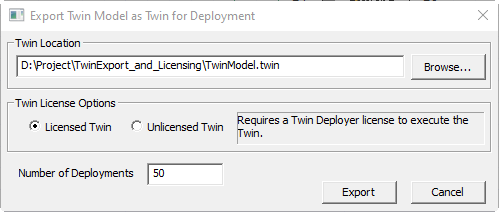
Right-click the model and select Export as > Twin for Deployment to open the Export Twin Model as Twin for Deployment dialog box.
Note:If Export As > Twin for Deployment is not available, then the selected model doesn’t support export as a .twin file. See Creating Twin Models for more information. Twin models created using earlier versions of Twin Builder (R20.1 or earlier) must be recompiled as twin models using the current version of Twin Builder. A twin deployment from a subsheet containing an encrypted TBROM is not allowed.
-
Browse to the target location for the exported .twin file.
-
Specify whether the exported twin should check out a license at execution time.
Note:If the twin model is exported as unlicensed twin, a separate export license is required. The Twin Deployer licenses for the licensed twin or the export licenses must be purchased separately.
-
Set the expected number of deployments.
-
Click Export to export the model as a .twin file.