
Assigning Finite Conductivity in 2D Extractor
In 2D Extractor, you can select an edge and assign a Finite Conductivity boundary. See: Working with Boundaries.
Finite conductivity boundary can only be assigned to the following conductor types: Signal Line, Non-Ideal Ground, Reference Ground or Floating Line.
Finite Conductivity Boundaries utilize an Impedance Boundary Condition formulation to solve. For finite conductivity boundaries to be considered during a simulation, a conductor must be assigned as Solve on Boundary or Automatic, as described in Working with Conductors.
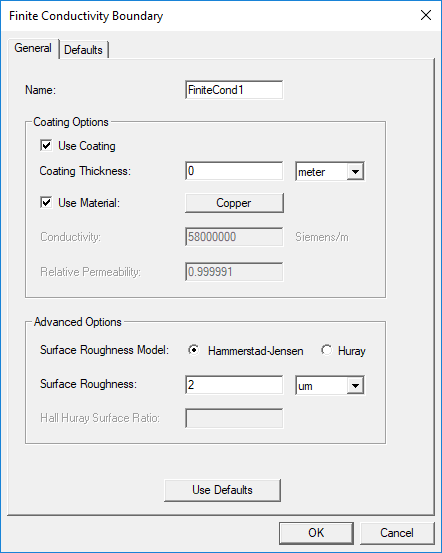
In the Finite Conductivity dialog box, you are asked to specify the Name, Coating Options, and Advanced Options.
- Use Coating – If you want to add a layer on top of the base object, select Use Coating and specify a Coating Thickness.
When this is deselected, the the project is solved using the Conductor Thickness specified while assigning conductors.
- Use Material – If you want to select an existing material for the coating, select Use Material.
Otherwise, you will need to specify the Conductivity and Relative Permeability.
- Surface Roughness Model – Select either Hammerstad-Jensen or Huray.
For Hammerstad-Jensen, you must specify the Surface Roughness and unit of measure.
For Huray, you must specify a Nodule Radius and Surface Ratio. The Nodule Radius describes the radius of copper spheres that model the surface roughness, while the Surface Ratio is a unitless quantity defined by the parameter sr:

where:
A is the area of a unit cell
N is the number of nodules per cell (modeled as spheres)
r is the radius of a typical nodule
Note:For more information about the complex-value-based, causal, modified Huray model used in the Ansys Electronics Desktop software, see the Huray Surface Roughness Model topic.