
Modal Report
The following display types are available for modal reports in Mechanical – Modal solutions:
- 2D (Rectangular) Plot
- Stacked Plot
- Data Table
- 3D Plot
- 2D Contour Plot
In this topic, we will focus on the display types that are most likely to be used for modal reports, specifically, Data Tables, 2D (Rectangular) plots, and Stacked plots. The procedure for creating other types of plots is similar. Data tables and discrete or bar graphs are best suited for plotting modal frequency results. It is best to avoid continuous curve plots because the interpolated values between calculated vibration modes would be invalid.
The available modal results are listed and described in the Results introduction. Examples of Data Tables, 2D plots, and Stacked plots follow:
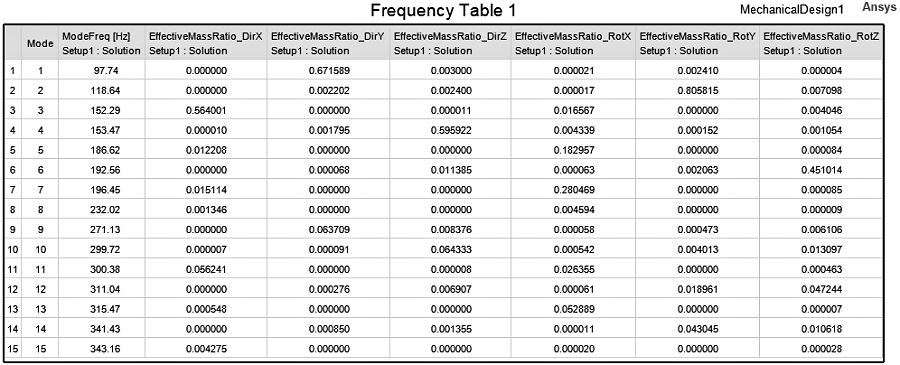
- Data Table: Modal results are particularly well suited for this display type. The same information is available as for curve plots, but the information is presented as tabulated numerical results.
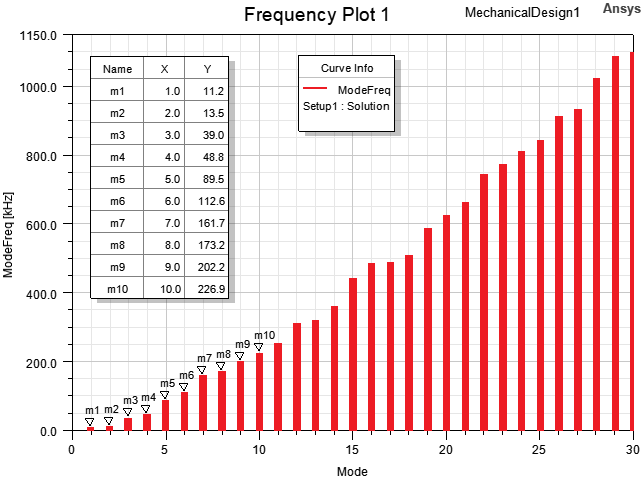
- 2D (Rectangular) Plots: This display type produces continuous traces by default. After creating the plot, change the Trace Type attribute to a discrete or bar type. You can plot one quantity or multiple quantities using this format, with all of the results sharing the same Cartesian grid and axes.
- Stacked Rectangular Plots: This display type is intended for multiple traces. Unlike the 2D plot previously described, this type puts every individual trace in a separate Cartesian grid stacked vertically. The X scale is shared by all traces, but the Y scale is adjusted to suit each individual trace.
The following image is an example of a data table listing natural vibration frequencies and effective mass ratio results in all degrees of freedom for each mode. A total of fifteen modes were calculated. The Number Format for the Mode column was changed to integer, the Field Precision of the ModeFreq column was reduced to 2 (decimal places), and the column widths were customized:
Tables are also well suited for presenting results on which you have performed mathematical operations (such as summing a quantity or reporting the maximum, minimum, or average values).
The following image is an example of a Frequency vs. Mode 2D (rectangular) plot for a 30 mode solution with the Trace Type attribute set to Bar Infinity. Additionally, the X axis Number Format was defined as Integer, and the Y axis scale and units were customized. Finally, markers were added to tabulate the exact frequencies of the first ten modes:
The following image is an example of an Effective Mass Ratio vs. Mode stacked plot showing all six degrees of freedom:
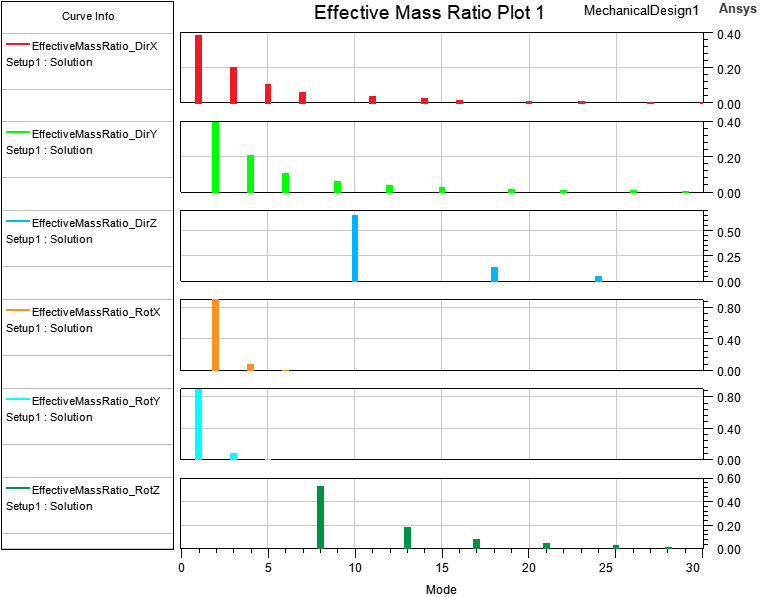
This plot provides a good visual indication of the most significant vibration modes for each degree of freedom.
See the subtopic, Creating a Modal Report, for step by step instructions on creating and customizing modal reports.