
Assigning Solid Block Properties
A solid block is a block with a solid material assigned and the Solve Inside option enabled. Solid blocks represent actual solid objects and can possess physical and thermal characteristics such as density, specific heat, thermal conductivity, and total heat flux. Icepak considers the interior of a solid block to be part of the computational domain and includes the block internal temperature distribution as part of the model solution.
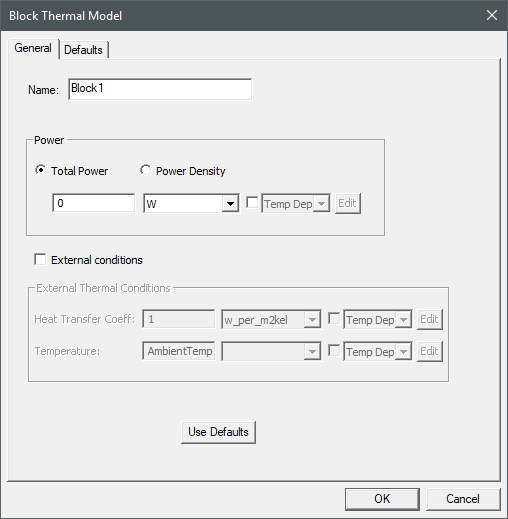
The Block Thermal Model dialog box contains the following general and thermal information for the selected boundary condition.
- If needed, you can enter a temperature dependent expression for Total Power, Heat Transfer Coefficient, or Temperature. See Temperature Dependent Thermal Properties for more information.
- If needed, you can define Total Power as a spatial, or volumetric, profile using an expression and a 3D dataset. See Adding 3D Datasets for more information.
| Name |
The Name of the boundary condition appears in the Project Manager window and 3D Modeler window. |
| Power | The Power specifies type of power assigned to the block. Total Power specifies the total power dissipated by the solid block. For steady-state simulations, if needed, select the check box and select Temp Dep or Joule Heating. For Temp Dep, click Edit to specify the temperature dependence of power. For transient simulations, select Temp Dep, Transient, or DTM. Alternatively, specify the power as Power Density. Transient allows you to specify power as a function of time. DTM (dynamic thermal modeling) allows you to specify a temperature-dependent power after each time step of a transient simulation. |
|
Note: For more information on specifying transient power, see Specifying Parameters as a Function of Time. For more information on dynamic thermal modeling, see DTM - Thermostat for Source Control. |
|
| External Thermal Conditions | External Thermal Conditions specifies a Heat Transfer Coefficient and a reference Temperature for the volume of space on the immediate exterior of the currently selected side of the solid block. |
Assigning a Solid Block and Defining Thermal Properties
To assign a solid block boundary condition and define its properties:
- Press O to enable object-selection mode.
- Select and right-click a three-dimensional geometry component in the 3D Modeler window or the history tree.
Note:
To assign a solid block type, ensure that the material assigned is solid and the Solve Inside option is enabled.
- From the right-click menu, select Assign Thermal>Block.
- In the Block Thermal Model dialog box, enter a Name for the block.
- Under Power, do one of the following:
- For steady-state simulations, if needed, select the check box and select Temp Dep or Joule Heating. For transient simulations, select Temp Dep, Transient, or DTM. For Temp Dep, click Edit to open the Temperature Dependent Variation dialog box and specify the Variation function and values.Note:
Joule Heating uses the block geometry's Thermal Conductivity to calculate the block's power. See Joule Heating in Icepak for more information.
- Select Power Density and enter a power density value for the block.
- For steady-state simulations, if needed, select the check box and select Temp Dep or Joule Heating. For transient simulations, select Temp Dep, Transient, or DTM. For Temp Dep, click Edit to open the Temperature Dependent Variation dialog box and specify the Variation function and values.
- If needed, select the External conditions check box and enter the following values:
- Heat Transfer Coeff
- Temperature
- Click OK.
The boundary condition dialog has a Defaults tab, which contains information related to default settings for the boundary condition properties and the following buttons:
- Save Defaults saves the currently defined properties as the default for newly created boundary conditions.
- Revert to Standard Defaults sets the boundary condition properties to the saved default values.