
DTM - Thermostat for Source Control
Thermostat for Source Control enables you to define temperature-dependent power in transient designs for selected 2D source geometry (sheets) and 3D block geometry by specifying trigger temperatures and power factors.
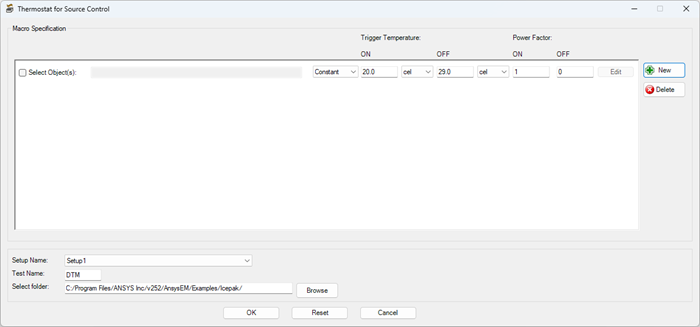
| New/Delete | Click New to add a row to define temperature-dependent source or block geometry. Click Delete to remove a row. |
| Selected Object(s) | Enable Selected Object(s) to open the Select Object(s) dialog box and select the source(s) and/or block(s) for which you want to define temperature-dependent power. |
| Constant/Varying | Select Constant or Varying. With Constant selected, enter Trigger Temperature and Power Factor values for the selected object. With Varying selected, click Edit to define multiple temperature and power factor values to define heating and cooling cycles. |
| Trigger Temperature | Under Trigger Temperature, enter the ON and OFF trigger temperatures. When the objects' temperature is between the specified temperatures, the associated power factor is applied. |
| Power Factor | Under Power Factor, enter the ON and OFF power factors to be applied to the selected objects' power when the objects' temperature is between the specified trigger temperatures. |
| Edit | With Varying selected, click Edit to specify heating and cooling cycle curves by entering Temperature and Power factor values in the Curve Specification dialog box. |
| Setup Name | In the Setup Name drop-down list, select the Icepak solve setup. |
| Test Name | In the Test Name field, enter a file name for the control program script. |
| Select folder | Click Browse to select a folder in which to save the control program script. |
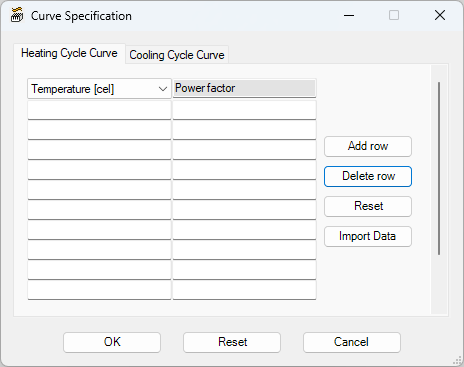
In the Curve Specification dialog box, the Temperature and Power factor values control how much power is applied during different stages of the simulation. For example, if the ON temperature is 30 degrees Celsius and OFF temp is 40 degrees Celsius, you can create curves for finer control.
| Heating Cycle Curve | Cooling Cycle Curve | |||
|---|---|---|---|---|
| Temperature | Power factor | Temperature | Power factor | |
| 32 | 4 | 38 | 3 | |
| 37 | 4.5 | 33 | 1 | |
| 39 | 5 | 31 | 0 | |
In this case, until the temperature reaches 40 degrees, a constant ON power of 4 watts will be used. Once it reaches 40 degrees, the model applies values specified in cooling cycle. The values in cooling cycle are used until the temperature reaches 30 degrees. When the output temperature drops to 30 degrees, the heating cycle is used until the temperature reaches 40 degrees.