
Welcome to the Ansys Electronics Desktop
The Ansys Electronics Desktop, illustrated in the following figure, provides a comprehensive environment for designing and simulating various electronic components and devices. The Ansys Electronics Desktop consists of a unified user interface where both electromagnetic designs and circuits can be created. Typically, you can create or import a design, set up the simulation, validate your design, run the analysis, and post process the results.
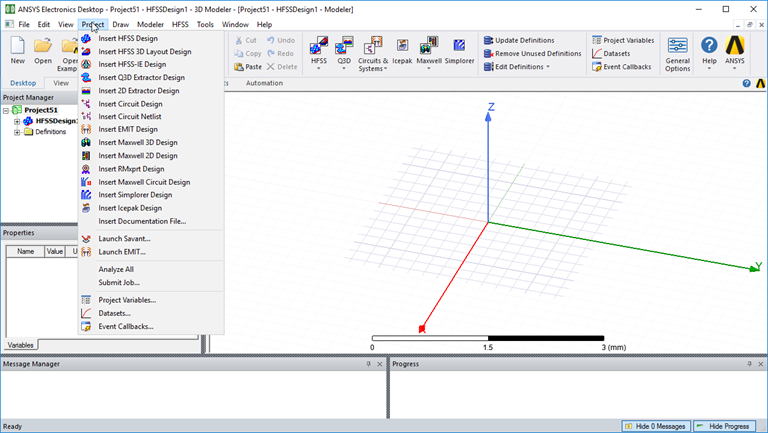
The desktop has the following design types and features:
- HFSS - a general purpose 3D interface for the design, analysis, and simulation of electromagnetic components.
- HFSS 3D Layout - a full-wave layout-based electromagnetic simulator with a specialized interface for geometries created in layout.
- HFSS-IE - a full wave Integral Equation solver for large open problems.
- Q3D Extractor - a quasi-static 3D solver for extracting lumped RLGC parameters and Spice models.
- 2D Extractor - a 2D solver for extracting per-unit-length RLGC parameters of transmission lines.
- Circuit - a schematic-based interface to the Nexxim circuit simulator.
- Circuit Netlist - a netlist (text-based) interface to the Nexxim circuit simulator.
- EMIT – system simulation for predicting and mitigating radio frequency interference (RFI) in electronic devices.
- Maxwell 3D - uses finite element analysis (FEA) to solve three-dimensional (3D) electrostatic, magnetostatic, eddy current, and transient problems.
- Maxwell 2D - uses finite element analysis (FEA) to solve two-dimensional (2D) electrostatic, magnetostatic, eddy current, and transient problems.
- RMxprt - a template-based electrical machine design tool that provides fast, analytical calculations of machine performance and 2-D and 3-D geometry creation for detailed finite element calculations in Ansys® Maxwell®.
- Maxwell Circuit - sets up external circuit designs to supply excitations to coil terminals for Maxwell 2D and 3D Eddy Current and Transient designs.
- Simplorer - an integrated, multi-domain, mixed-signal simulator for complex technical systems.
- Icepak - a general purpose 3D interface for the design, simulation, and thermal analysis of electronic components
- Mechanical – (Beta) perform Modal analyses to determine natural frequencies of vibration and Thermal analyses to determine temperatures and heat flux.
You can also launch the following tools:
- Launch Savant - a tool for simulating near-field, far-field, and coupling performance of antennas installed on platforms and within other complex and electrically large environments.
- Launch EMIT - a simulation tool for the prediction of radio frequency interference (RFI) in complex environments.
If you go to the Project menu, you can access all of the design types. Any combination of these design types can be inserted into a single project file. The schematics can be used to wire up the different field solver models and create a model of a high-level system. The Ansys Electronics Desktop provides an efficient way to manage complicated projects that require several different analysis tools to model all of its pieces. Designs can also be parameterized. With the help of the Optimetrics feature the best design variations can be made available to other modules when the designs are linked into a higher level simulation. This lets you study the effect of varying a design parameter on the behavior of the entire system.