
Verification Points Table
From the Response Surface tab, use the View list box to select all available views of the selected response-surface-setup. All verification points appear in the Verification Points table view:
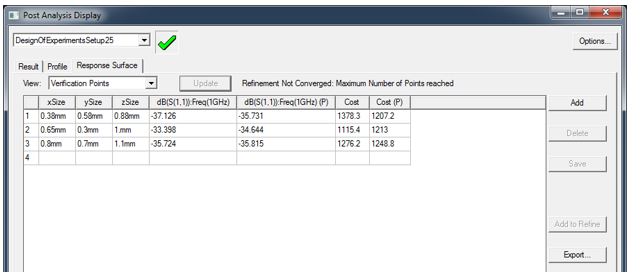
Use verification points to verify that the response surface accurately approximates the output parameter values. They compare the predicted and observed values of the output parameters.
You can add, delete and modify verification points manually.
- Same as add/delete/modify refinement points.
- Insert from Response Points table view.
Click Add to Refine to insert the selected response point to the refinement table.
A design point update (that is, a "real solve") calculates each verification point. These verification point results are then compared with the response surface predictions and the difference is calculated.
Verification points are useful in validating any type of response surface. In particular, however, you should always use verification points to validate the accuracy of interpolated response surfaces, such as Kriging or Sparse Grid.
You can add, delete, save, or export verification points with the command buttons, or you can modify verification points manually by modifying point values directly in the grid.