The Project Manager Window
The Project Manager window shows the projects loaded into Twin Builder. Each project may consist of one or more designs.
To toggle display of the Project Manager window:
- Click View > Project Manager.
- On the ribbon, click View > Docking Windows > Project Manager.
The Project Manager window contains details about all open Twin Builder projects in a form known as the Project tree, as shown below:
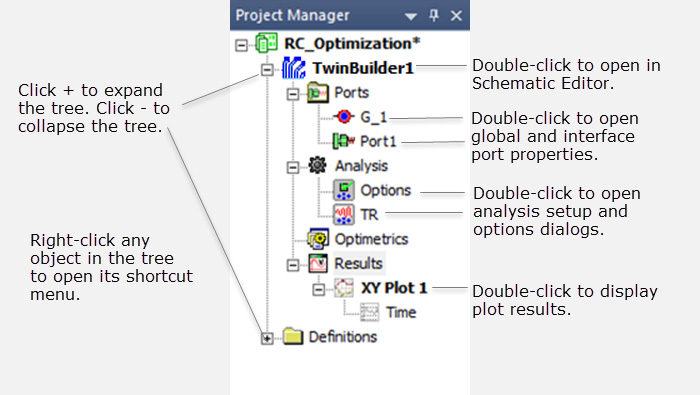
The top node listed in the Project tree is the project name. It is named Projectn by default, where n is the order in which the project was added to the current session of Twin Builder. Expand the project icon to view all the project’s Twin Builder design information and material definitions. If there are multiple designs in a project, each design’s ports, analysis solution setup, and results are displayed as entries in a separate subtree.
Depending on the options set in the User Interface panel under General in the Options dialog box, the selected Project tree may be rendered in bold text; or a small “window” icon may display next to the selected Project tree. The icon will be gray if the editor or plot window associated with the selected element is closed, or not in focus. Click the gray icon to open the window and bring it into focus (on top).
Right-click a folder or item to display a shortcut menu. For example, right-click Analysis to display this shortcut menu:
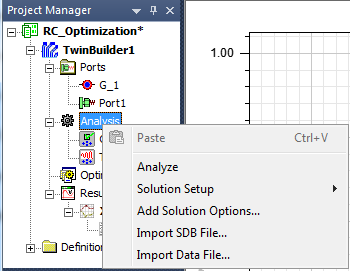
Virtually all project editing and management can be done in the Project Manager pane; simply right-click the items in the pane. Many of these functions are also available from the main menu bar in the Twin Builder menu.
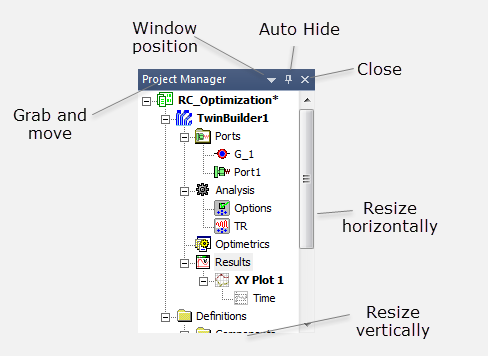
You can move and resize the Project Manager window as needed. You can also dock it to any edge of the Twin Builder desktop.
|
Hints |
|
There are controls on the window when it is docked, as shown below: