
General Options: User Interface
Under General Options, User Interface options allow you to change how Ansys Electronics Desktop displays messages, command text, the project tree, welcome messages, and more.

In the General area, options include:
- Show Message Window on new messages – When selected, the message window automatically opens if a message arrives.
- Ensure that new messages are visible in the Message Window Tree – When selected, the message window expands as needed to display messages.
- Show Progress Window when displaying progress bars – When selected, the progress window automatically opens while simulations are in progress.
In the Project Tree Visualization Options area, options include:
- Emphasize active command context – when selected, active elements in the Project Tree display in bold text.
- Change icon when selection does not match active window – when selected, a small, window-shaped overlay icon displays in the corner of the selected Project Tree element. This icon changes when the data in the active window is unrelated to the selected project item (data affecting the same model is considered to be related). Clicking the icon opens the window and brings it into focus.
- Expand Project Tree on Insert – when selected, the Project Tree automatically expands when you insert a new design.
In the Display Options area, specify the Maximum Number of Significant Digits to display. The default is 8 and the maximum is 20. This affects the digits displayed in the Solutions dialog box, evaluated variable values, Animation dialog boxes, Optimetrics, Reports, and so forth. You can still see the full precision values in tooltips by holding a cursor over the displayed value.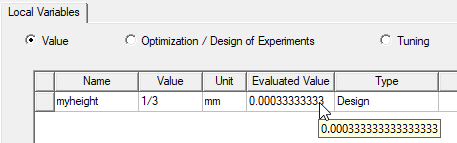
In the case of variable values, if you have assigned more significant digits, you will see these when editing the variable value. In the case of table displays of values, the tooltip display shows all available digits when the mouse pointer is over a result:
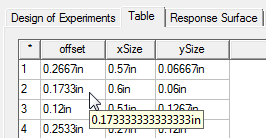
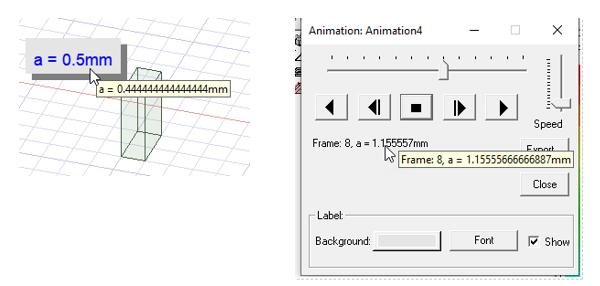
The tooltip functions to show internal digits in throughout the Ansys Electronics Desktop interface.
Select a Color Scheme. The choices are Light (Beta), Dark (Beta), or Classic: See Choosing a Color Scheme for more information and samples of each scheme.
Select Show welcome message at startup if you want to see a welcome message when Electronics Desktop opens.
Enable legacy view navigation enables you to choose between two schemes for view navigation keyboard shortcuts and mouse button assignments, as follows:
- Cleared: Use only the view navigation mouse-button and hotkey assignments introduced in (Undefined variable: Primary.AnsysElectronicsDesktop) 2024 R1 and applicable to subsequent versions too. Legacy (2023 R2 and earlier) mouse-button and hotkey assignments will not be recognized when this option is cleared.
- Selected: Both the legacy (2023 R2 and earlier) and current (2024 R1 and newer) mouse-button and hotkey assignments are supported, and either can be used for view navigation.
See Choosing the View Navigation Options for more information, including a detailed comparison of the two schemes.