
Saving Uncompiled Model Changes
The Twin Builder model editors for VHDL-AMS, SML, Spice, and Modelica can save the model text to the model without having it compiled. These changes are saved with the model independently from the last compiled model state so you can save a working state of the model text and work on it later. It is not possible to save multiple states of a model text or switch between them. After the model text is compiled successfully, the saved working state text is removed from the model.
- You cannot export an uncompiled version of a model test to a model library.
- If you export a model definition that has been compiled but contains a newer uncompiled version of the model text, the uncompiled version of the model text will be removed from the exported model definition.
To save the uncompiled text of a model:
- Click modeltypeModel Editor > Save Uncompiled Changes.
The model definition is displayed in the Project Manager pane:
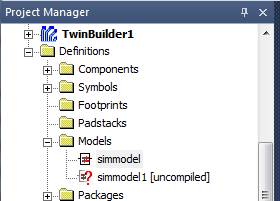
The icon next to it indicates its state:

|
Model text that has never been compiled. |

|
Model text that has been compiled successfully and has no uncompiled version stored. |

|
Model text that has been compiled successfully and has an uncompiled version stored with it. |
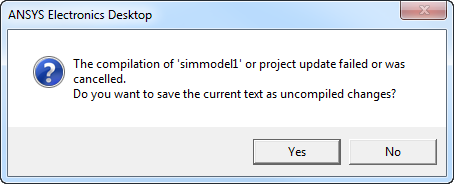
- When closing the model editor, Twin Builder tries to compile any uncompiled changes of the model text. If this compilation fails or is canceled, you can save those uncompiled changes. Click Yes on the following prompt.
To reopen the uncompiled text of a model:
- Select Edit Model in the context menu of the component instance on the schematic or the model definition in the Project Manager.
- On opening, the model editor asks whether to load the uncompiled text or the text of the last compiled state of the model.
If you don’t load the uncompiled model text when opening the model editor, the uncompiled version of the model text is removed from the model.
Related Topics
Using the VHDL-AMS Model Editor
Using the Modelica Model Editor