
Performing Worst Case Analysis
Two popular worst case analysis techniques can be implemented: extreme value analysis and Monte Carlo analysis.
Some setup is required before performing worst case analysis. First, identify uncertainties in design and create a local or project variable for each of them. Second, determine the variation range of each variable (Min and Max); its statistical distribution is optional. Third, determine a measurement of performance, especially for extreme value analysis.
This is one of the most popular methods to estimate worst-case performance. First perform a sensitivity analysis. The results (sensitivities/first derivative) let you pick an extreme value (upper or lower bound) for each variable. The corresponding simulation result is used to predict upper and lower bound of performance. The assumption is that extreme performance is reached at boundary value. Note that in certain cases, making such an assumption is not valid.
To perform an extreme value analysis:
-
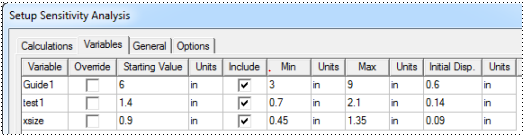
Create a new analysis under Optimetrics Analysis > Add Sensitivity, and include variables in a sensitivity analysis. To do so, go to your list of variables, specify Min and Max values of each variable, and select Include. The following figure shows an example with three variables included:
-
Follow Setting up a Sensitivity Analysis. During this procedure, set your performance measurement in the Calculations tab, select all variables in the Variables tab, and select Perform worst case analysis in the General tab.
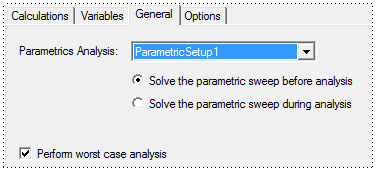
- After setup, analyze your Sensitivity Setup under Optimetrics.
Select Perform worst case analysis to calculate first derivatives for each variable. If you have three variables and for Var1 the first derivative is negative, for Var2 the first derivative is positive, and for Var3 the first derivative is positive, then for Worst Case Analysis, you should request two more variations:
Var1@minimum, Var2@maximum, Var3@maximum
and Var1@maximum, Var2@minimum, Var3@minimum
To view a worst-case result (upper bound only):
- Create a Data Table report.
- In the Context pane in the Report dialog box, select matching Solution and Optimetrics setup.
- On the Families tab, change the setting to All in the Value column for each variable.
- On the Families Display tab, select Statistics, then Max.
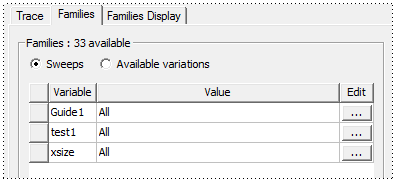
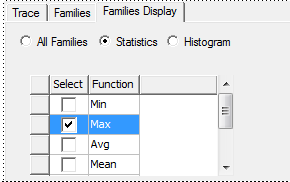
The associated data table shows the Max values.
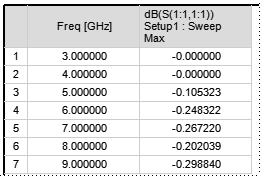
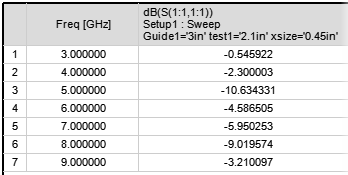
To see the corresponding variable values, select All Families on the Families Display tab, and locate the max value to see the values of variables.
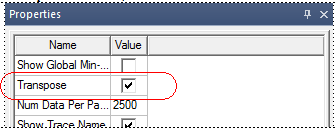
Tip: Transpose the table for an alternate view (double-click the data table to view the Properties dialog box, and on the Data Table tab select Transpose).
To estimate lower bound of performance:
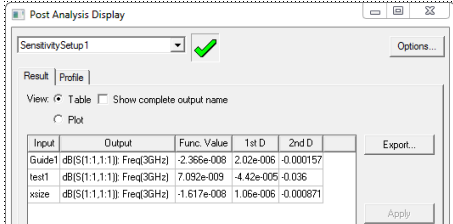
- Set the sensitivity of performance for each variable. (Follow the documentation for Viewing Output Parameter Results for a Sensitivity Analysis). Identify the variables that have major influence on the performance.
- In your project, manually change these variables to the corresponding bounds: choose Min for a positive first derivative and Max for a negative first derivative.
Related Topics
Example of a Worst Case Analysis
Monte Carlo Analysis
This method does not assume a circuit is linear; better accuracy is achieved with more iterations. The cost is computing time and resources.
To perform a Monte Carlo Analysis, create a new analysis under Optimetrics Analysis > Add Statistical. See Setting Up a Statistical Analysis to set this up. The upper and lower bound of performance can be found on the edge of performance distribution.
Tip: If the distribution of performance is not of interest, set all variables as uniformly distributed.