Param Values Tab (Properties Window)
The Param Values tab lists the component’s simulation parameters such as the InstanceName, Type, and Status.
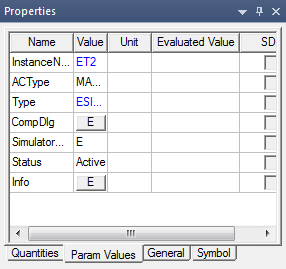
- Click the button in the Value column for CompDlg to open the component special dialog box for entering parameter values.
- Click the button in the Value column for Info to launch the help topic for the component.
- To set or change the value of a component parameter, click the Value field and enter the new value. If the value requires a multiplier unit (such as kOhm for “´1000”) click the Unit field to select the multiplier unit. The Evaluated Value shows the resulting number.
- Specify a parameter value using an expression that evaluates to a constant. The expression is retained in the Value field, while the Evaluated Value field shows the constant resulting from evaluating the expression. You can then identify and modify the expression in the future.
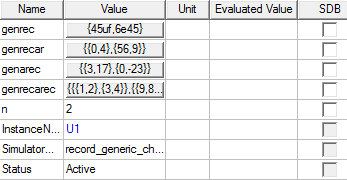
- Component parameters with composite properties
also have buttons in the Value
column. A composite property is an array or record property
(parameter, quantity, or signal), generally based on a model property,
that represents a combination of elements. Click the button to view details
and edit these properties in the Array/Record Element Values dialog
box.