
Import Large Scale DSO Dataset Solution
For post-processing large scale DSO dataset solutions in the desktop, create a dataset solution with Import Large Scale DSO Solution and point to large scale DSO job’s top level results folder.
- Import solved large scale DSO solution. You can do this in two ways.
In the Project tree, right-click Optimetrics and select Import Large Scale DSO Solution.
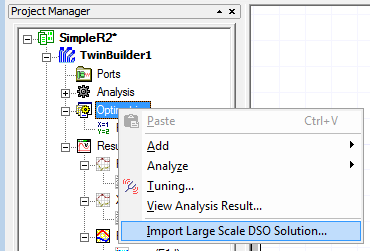
This opens the Import Large Scale DSO Dataset Solution dialog box.
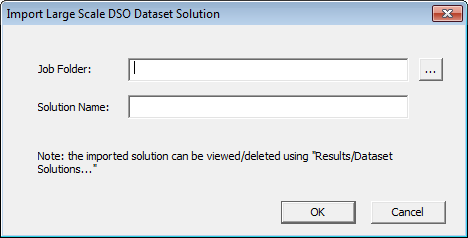
From here you can browse to the results of a large scale DSO job and select a job folder. See Large Scale DSO Results Database Organization.
You can then specify the job folder. A dataset solution will be created and appear in the Dataset Solutions dialog box.
You can also import a large scale DSO dataset with the Dataset Solutions dialog box.