
Large Scale DSO Results Database Organization
A large scale DSO analysis does not support the output of full parametric results. Instead, it extracts “subset” results using predefined rectangular plots, which you must create before running a job. The extracted columns of data are saved as CSV files. Typically, there is one CSV file per trace, per variation. Non-rectangular plots of the design are not extracted.
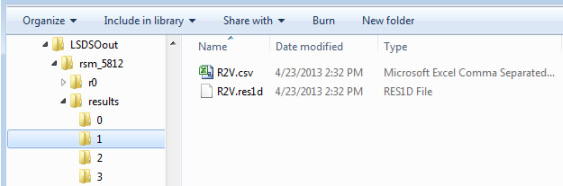
The results of a large scale DSO job are located in the <workdir>/<jobid>/results folder. If <workdir> is not specified on the job command line, it is same as the input project's results folder. For example, the default <workdir> corresponding to \\shared\projects\SimpleR2.aedt is \\shared\projects\SimpleR2.aedtresults. Within this results folder, there is one folder per variation. The name of the variation's folder is an integer number corresponding to the variation's index in the parametric table. For example, a variation folder named 4 has results for the fifth row of parametric table, while a variation folder named 0 has results for the first row of the table.
Below is a sample results folder showing the contents corresponding to results of the second variation. There is one CSV file corresponding to the project’s predefined trace.
Related Topics