
For -batchoptions Use: Various Desktop Settings
Note that most of these options only affect the GUI. To view these options from the Submit Job To window:
- In the Analysis options area of the Submit Job To window, click Add....
- In the Add Batchoption window that appears, select Desktop/Settings from the Show registry key entries drop-down menu.
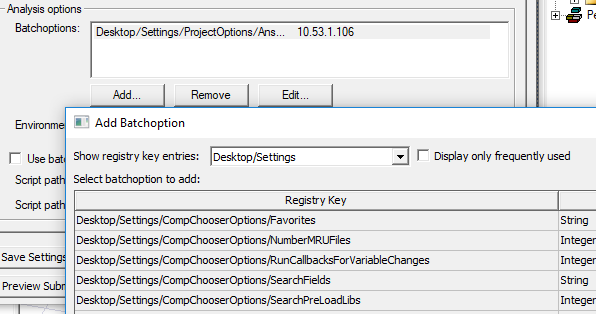
|
Registry Key |
Default Value |
Units or Values |
Description |
|
Desktop/Settings/ProjectOptions/AnimationMemory |
200 |
Megabytes (MB) |
Stop animations when available memory falls below this value. |
|
Desktop/Settings/ProjectOptions/AnsoftCOMPreferredIPAddress (see note below table) |
"" |
IP address (as a string) |
IP address used to connect from COM engines to ansysedt.exe. |
|
Desktop/Settings/ProjectOptions/AnsoftCOMPreferredSubnetAddress (see note below table) |
""
|
Subnet address |
Subnet used to connect COM engines to ansysedt.exe –
|
|
Desktop/Settings/ProjectOptions/AutoSaveInterval |
10 |
edits |
Number of edits to allow between autosaves. |
|
Desktop/Settings/ProjectOptions/AutoShowMessageWindow |
1 (true) |
0 (false) or 1 (true) |
Show message window on new messages. |
|
Desktop/Settings/ProjectOptions/AutoShowProgressWindow |
0 (false) |
0 (false) or 1 (true) |
Show progress window when starting a simulation. |
|
Desktop/Settings/ProjectOptions/DiskLimitForAbort |
0 |
Megabytes (MB) |
A warning displays when available disk space falls below this value. |
|
Desktop/Settings/ProjectOptions/DoAutoSave |
1 (true) |
0 (false) or 1 (true) |
Enable or disable autosaves. |
|
Desktop/Settings/ProjectOptions/DrawStateIconsInProjectTree3 |
1 (true) |
0 (false) or 1 (true) |
Change icon when selection does not match active window. |
|
Desktop/Settings/ProjectOptions/ExpandMessageTreeOnInsert |
1 (true) |
0 (false) or 1 (true) |
Ensure that new messages are visible in the message window tree. |
|
Desktop/Settings/ProjectOptions/ExpandOnInsert |
0 (false) |
0 (false) or 1 (true) |
Expand Project tree on insert. |
|
Desktop/Settings/ProjectOptions/HighlightActive |
1 (true) |
0 (false) or 1 (true) |
Emphasize active command context (menu and toolbars). |
|
Desktop/Settings/ProjectOptions/SavePreviewImagesInProject |
1 (true) |
0 (false) or 1 (true) |
Save preview images in project file. |
|
Desktop/Settings/ProjectOptions/UpdateReportOnFileOpen |
0 (false) |
0 (false) or 1 (true) |
Update reports on file open. |
The preferred IP address and preferred subnet address settings are mutually exclusive. If both are specified to be non-empty strings, then the preferred IP address takes precedence, and the preferred subnet address is ignored. This feature is typically used for cluster environments using batch solves. The setting can be made via batchoptions but can also be done via UpdateRegistry.
Related Topics
For -batchoptions Use: Project Directory and Lib Paths