
Choose Mechanical Solution Type
After inserting a Mechanical design into your project, choose the desired Solution Type as follows:
- Access the Solution Type dialog box using one of the following two methods:
- Using the menu bar, click Mechanical > Solution Type.
- Right-click the mechanical design in the Project Manager (named MechanicalDesignx by default) and choose Solution Type from the shortcut menu.
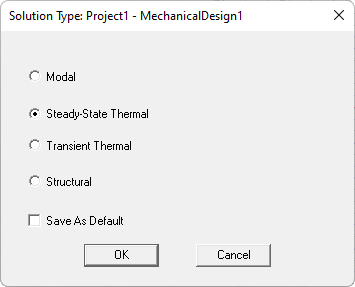
- From the Solution Type dialog box that appears, select one of the follow four available options:
- Modal: To perform a natural frequency analysis, which determines the frequencies at which a structure vibrates and the associated mode shapes.
- Steady-State Thermal: To determine the temperature and heat flux distribution when the model reaches a state of thermal equilibrium based on the assigned constant boundaries and excitations.
- Transient Thermal: To perform a thermal analysis in the time domain, which determines how temperature and heat flux distribution vary with time. Assigned thermal boundaries and excitations can vary with time for this solution type.
- Structural: To perform a stress analysis, which determines displacements and stresses resulting from thermal expansion or contraction and assigned displacements, forces, or pressures.
- Both Modal and Structural solution types have unique licensing requirements that must be satisfied for the solutions to run successfully.
- Optionally, select the Save As Default option if the current Solution Type choice is not already the default and is what you expect to perform for the majority of Mechanical designs.
- Click OK.
Note: