
Applying Curvilinear Elements
For HFSS, Maxwell, and Mechanical designs, Curvilinear elements provide an accurate representation of the CAD model geometry by improving the conformity of element nodes to curved CAD surfaces. You can apply curvilinear elements as a Mesh Operation on selected curved model faces see procedure below or as a global option in the Initial Mesh Settings dialog box.
For
When curvilinear elements are applied globally or to specific CAD faces, the meshing process attempts to pull corner nodes of elements added during mesh refinement to the curved CAD faces. The following figures explain the effects with and without curvilinear elements applied:
- With the Apply Curvilinear Elements option not selected:
- With the Apply Curvilinear Elements option selected:
Corner nodes of an initial coarse mesh are located on curved CAD surfaces. However, as the mesh is refined, the corner nodes of any additional elements remain along the plane of the initial mesh's element faces. Therefore, the number of facets along a curved face (in the circumferential direction) does not increase, and the facets remain coarse. This effect is shown in the first mesh plot below. Note the red-circled nodes. These nodes were added as a result of mesh refinement, and they were not pulled to the curved CAD face:
The meshing process will attempt to pull all corner nodes of additional elements added during mesh refinement to the curved CAD faces. Therefore, the facets along curved faces are finer, and the conformity of the mesh to the curved CAD faces is improved. The effect is as shown in the following, second mesh plot:
How to Apply Curvilinear Elements to Specific Curved Faces:
- Select the object or face to which you want to apply curvilinear elements.
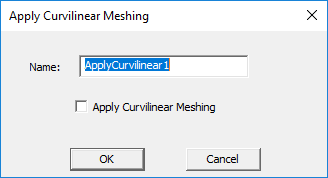
- Select Mesh in the Project Manager, right-click for the short cut menu and select Assign Mesh Operation > Apply Curvilinear Meshing.
- Either accept the default name or provide one of your own.
- Select Apply Curvilinear Meshing.
- Click OK.
The Apply Curvilinear Meshing dialog box appears.
The defined Mesh Operation appears in the Project Manager.