Electronics Desktop Icepak Systems in Workbench
The following details are specific to Ansys Electronics Desktop (AEDT) Icepak systems within a Workbench schematic. These details apply Whether the system is newly created or is an existing AEDT Icepak design that has been imported into the Workbench schematic:
- Only Steady-State and Transient solution types are currently supported for Electronics Desktop Icepak systems in Workbench.
- The referenced AEDT project can only contain a single design.
- The linked AEDT project’s design cannot include any type of coupling or linking with other AEDT projects or designs, such as:
- Mesh linking
- Imported loads (for example, EM Losses from an HFSS source design or heat transfer coefficients from an Icepak source design)
- Layout Components (for trace mapping based on an HFSS 3D layout source design of a printedcircuit board)
- When you create a new Electronics Desktop Icepak system by dragging it from the Workbench Toolbox, the following will occur when you right-click the Geometry cell and choose Edit:
- When linking temperature data between Electronics Desktop Icepak and Electronics Desktop Mechanical systems, the Icepak simulation must be run within Workbench.
- When you import an existing AEDT Thermal project, a copy of the design is created in a subfolder of the Workbench project location, preserving the original source design.
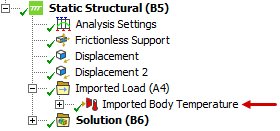
- After setting up and solving the Electronics Desktop Icepak system and linking its solution to a Structural system setup, an Imported Body Temperature load will be automatically created and listed in the Structural solution branch of the Ansys Mechanical application. Edit the Structural setup to see this imported load.
Additionally, you can only link the temperature results from these solutions to Static Structural or Transient Structural analysis systems in the Workbench schematic.
Instead of attempting to link to a multi-design AEDT project, create multiple Electronics Desktop Icepak systems in the WB schematic, each referencing a single-design AEDT model.
The Ansys Electronics Desktop application will launch and a new project will be created having a blank Icepak design already added to it.