Joule Heating in Icepak
In the Electronics Desktop, you can model block and source boundary conditions using joule heating.
Joule Heating in Blocks
Blocks with solid materials can be assigned joule heating for Total Power in the Block Thermal Model dialog box.

When assigned joule heating, blocks use the bulk conductivity of the assigned material to calculate the total power. The total power is computed by solving an additional conservation equation for the electric potential at every iteration. This equation is only solved in the current-containing objects. The joule heating power is accurately computed per cell in each object.
From the Select Definition dialog box, click View/Edit Material. To display Bulk Conductivity, select All Properties and Electromagnetic under View/Edit Material for. If no thermal modifier is applied to bulk conductivity, it is assigned as a constant value. To assign bulk conductivity as a varying value, edit the material and apply a thermal modifier.
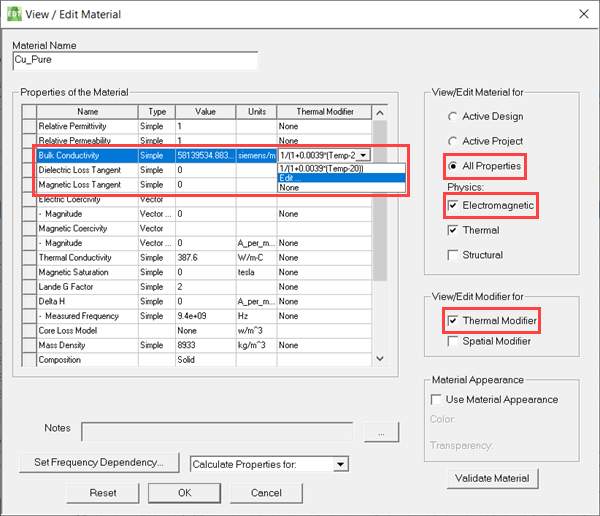
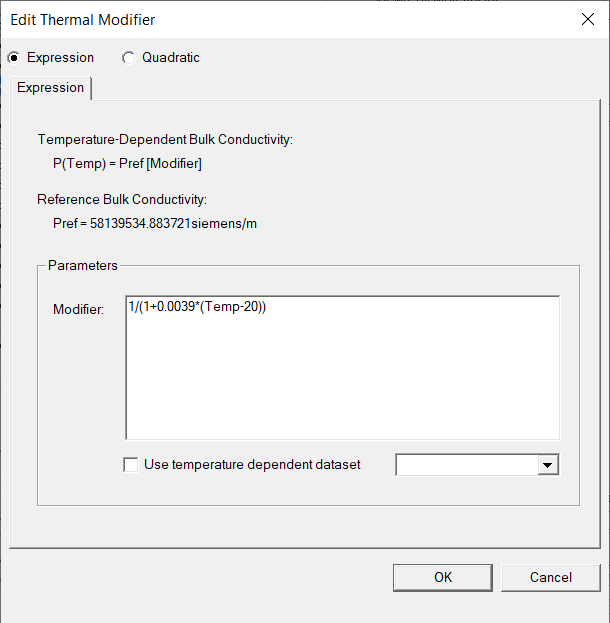
In the example above, the thermal modifier equation is as follows:

where  is the constant,
  is the intrinsic variable for the analysis temperature, and
  is the reference temperature.
Quadratic definitions or temperature dependent datasets are not currently supported.
Joule Heating in Sources
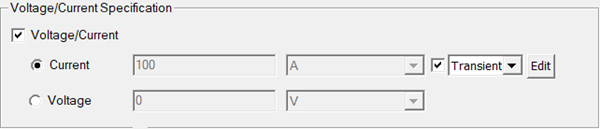
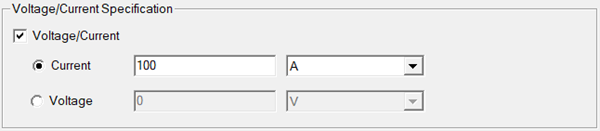
Sources can be assigned joule heating properties under Voltage/Current Specification in the Source Thermal Model dialog box. Select Current or Voltage. Enter a value and select the corresponding unit.
Time dependent variations are supported for Current and Voltage. See Specifying Parameters as a Function of Time for more information.