
Assign Grille Properties
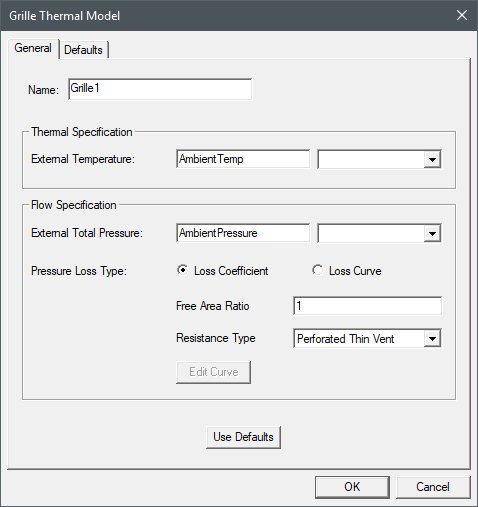
The Grille Thermal Model dialog box contains the following general and thermal information for the selected boundary condition.
| Name |
The Name of the boundary condition appears in the Project Manager window and 3D Modeler window. |
| Thermal Specification | |
| External Temperature | External Temperature specifies the temperature of the external fluid region. This temperature is used if fluid flows into the mesh region through the vent, and is ignored if fluid flows out of the mesh region through the vent. The default AmbientTemp is the Temperature specified in the Icepak Design Settings dialog box. |
| Flow Specification | |
| External Total Pressure | External Total Pressure specifies the external pressure. For flow into a grille, the external pressure is the stagnation pressure. For flow out of a grille, the external pressure is the static pressure. he default AmbientPressure is the Gauge Pressure specified in the Icepak Design Settings dialog box. |
| Pressure Loss Type: Loss Coefficient | |
| Free Area Ratio | Free Area Ratio is the ratio of the area through which a fluid can flow unobstructed to the total planar area of the obstruction. |
| Resistance Type | Resistance Type specifies the type of resistance, which includes the options Perforated Thin Vent, Circular Metal Wire Screen, and Two-Plate Screen Cyl. Bars. |
| Pressure Loss Type: Loss Curve | |
| Edit Curve | Clicking Edit Curve displays the Edit Dataset dialog box. In the Edit Dataset dialog box, specify coordinates for velocity and pressure to create the pressure loss curve. See Adding Datasets for more information. |
Assigning a Grille and Defining Thermal Properties
To assign a grille boundary condition and define its properties:
- Press F to enable face-selection mode.
- Select and right-click a two-dimensional geometry component in the 3D Modeler window or the history tree.
- From the right-click menu, select Assign Thermal>Grille.
- In the Grille Thermal Model dialog box, enter a Name for the grille.
- Under Thermal Specification, enter the External Temperature.
- Under Flow Specification, enter the External Total Pressure.
- Select one of the following for Pressure Loss Type.
- Loss Coefficient: Enter the Free Area Ratio and Resistance Type.
- Loss Curve: Click Edit Curve to create pressure loss curve.
- Click OK.
Note:
The boundary condition dialog has a Defaults tab, which contains information related to default settings for the boundary condition properties and the following buttons:
- Save Defaults saves the currently defined properties as the default for newly created boundary conditions.
- Revert to Standard Defaults sets the boundary condition properties to the saved default values.

|
Click here for scripting information related to this feature. |