
Working with Characteristic Data Curves
Enter data into the Characteristic Data section of the dialog box to describe the performance of the device representing either the Transfer Characteristic, Output Characteristic, or Freewheeling Diode Characteristic. In addition, you can manipulate the data by changing specific data points, adding new data, or excluding data from consideration when performing curve fitting and model parameter extraction.
The information in this section on working with data curves also applies to the Transient Thermal Impedance section in the IGBT Thermal Model dialog box.
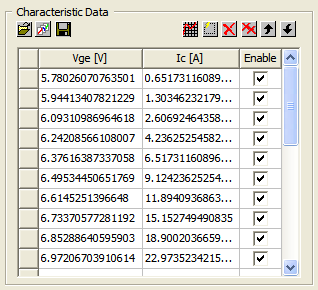
You can open, save, or import characteristic curves using the buttons listed in the following table.
|
|
Open an existing characteristic data file (.mdx file). |
|
|
Open the Dataset Manager dialog box to allow manual data point entry, data entry via the sheetscan tool, or import of a dataset from a file. |
|
|
Save the characteristic data to a file (.mdx file). |


To manipulate data in the curve:
- Click any data cell to make the cell editable, and change the data for that entry in the table.
- Select the check box next to any data point in the table to Enable/Disable the data point during the fitting.
- Click one of the buttons described in the following table.
|
|
Plot the selected characteristic curve. |
|
|
Create a new row of data for the selected characteristic. |
|
|
Delete the selected row of data. |
|
|
Delete all the data for the selected characteristic. |
|
|
Move the selected row of data upward. |
|
|
Move the selected row of data downward. |


