
Mini Toolbar
In SIwave options, Show Mini Toolbar on selection is enabled by default.
The mini toolbar provides basic operations and relevant actions for a selected object. Click on an object in the Modeling workspace to select it and show its mini toolbar.
Below are two mini toolbars, for a via and a trace.

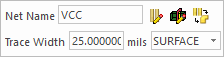
You can also select multiple similar objects and modify their properties using the mini toolbar.
The following types of objects show a mini toolbar:
- Trace
- Via
- Plane
- Bondwire
- Net
- Pin Group
- S-parameter Model / Spice RLC Model
- Circuit Element
- Board Element (ICs / IOs / PinPlates)