
Exporting an HFSS 3D Layout Project
To export the model as an HFSS 3D Layout project (*.aedt):
- Click Export to open the Export HFSS
3D Layout Project window.
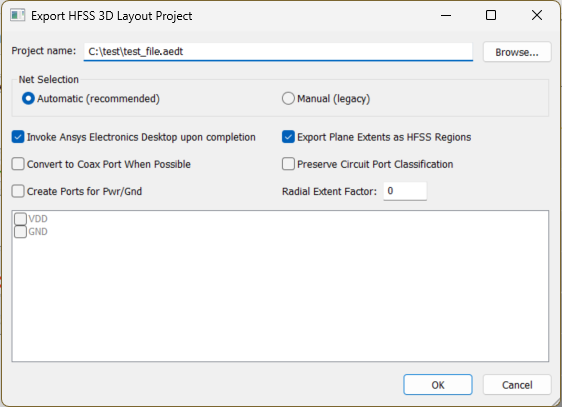
- From the Ansys EDA Layouts area, click HFSS 3D Layout.
- From the Project Name field, type a the destination folder and name for your file, or click Browse to select a directory.
- From the Net Selection area, select one of the two radio buttons:
- Automatic – selects nets based on the same algorithm used for determining nets to include in an SIwave SYZ simulation (also includes any nets where coaxial ports are automatically generated).
- Manual – selects nets using the same criteria used for HFSS 3D Layout simulations in release 2015 (uses the same logic as the MCAD exports).
- If appropriate, check any/all of the following boxes:
- Invoke Ansys Electronics Desktop upon completion – after the HFSS 3D Layout project is exported, Electronics Desktop opens with the new project active
- Convert to Coax Port When Possible – circuit ports with a positive terminal connected to a pin and a negative terminal connected to a pin group on the same component are exported as coaxial ports
- Create Ports for Pwr/Gnd – creates ports on nets selected from the table following the check box.
- Export Plane Extents as HFSS Regions – export the design's plane extents as HFSS regions in the HFSS 3D Layout project
- Preserve Circuit Port Classification – all ports are exported as circuit ports, ignoring other selected options (e.g., Convert to Coax Port When Possible)
- Enter a value in the Radial Extent Factor field. The radial extent factor sets the radius for the port geometry of coaxial ports. Entering 0 extends the radius of the pin as much as appropriate while creating port geometry, 1 creates port geometry that does not exceed the radius of the pin, and 2 creates port geometry twice the radius of the pin)
- Click OK to create the project.