
Editing Touchstone Port Properties
Touchstone is a standard format for n-port S parameter data. It allows you to import the S-parameters into third-party simulation tools.
To configure the options while exporting a touchstone file:
- Click Advanced > Touchstone Port Names.
- Export SIwave Port Names – the exported file will retain the original SIwave port names.
- Export Mapped Port Names – the exported file will use the newly defined names.
- Prompt for Naming Configuration on Export – you will be prompted to choose one of the these options at the time of export.
The Touchstone Port Naming Configuration window appears.
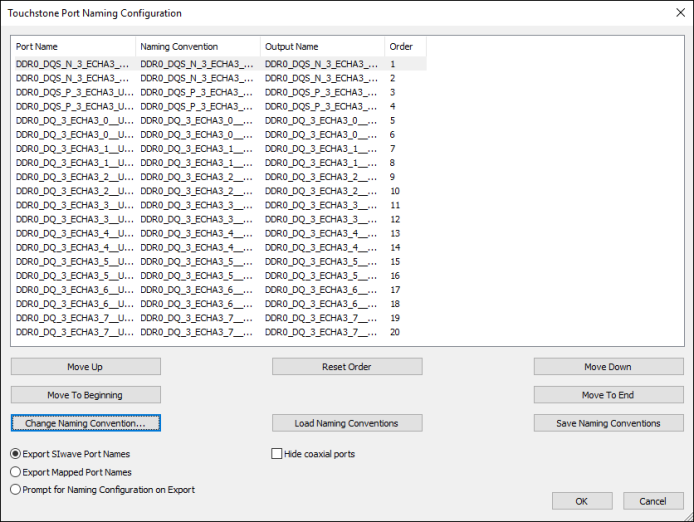
This window also contains coaxial ports created for HFSS 3D Layout simulations. You can hide these by selecting Hide coaxial ports.
The Move Up, Move Down, Move to Beginning, and Move to End buttons allow you to move rows in order to change port ordering in the output file. To return to the default settings, click Reset Order. The order is used for sorting, but does not necessarily indicate the absolute position of a port in the touchstone file since some ports may not be included in the results (e.g., inactive ports or coaxial ports not included in the simulations). You can also change the Touchstone port order via script.
The radio buttons offer three options for export:
To change the export naming convention:
- Select one or more ports and click Change Naming Convention.
The Touchstone Port Naming Convention window appears.
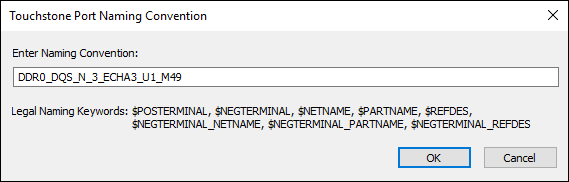
- Click OK.
- If you want to save your naming configuration for later, click Save Naming Conventions to save a *.pnc file. You can later click Load Naming Conventions to use a saved configuration.