
Adding a Resistor
A resistor is an electrical component that limits or regulates the flow of electrical current in an electronic circuit.
To add a resistor:
- Click Home. From the Circuit Elements box, click the Add Resistor icon (
 ).
). - Click the location where you want to place the resistor.
- Drag the mouse to an appropriate length and direction.
- Click to finish drawing.
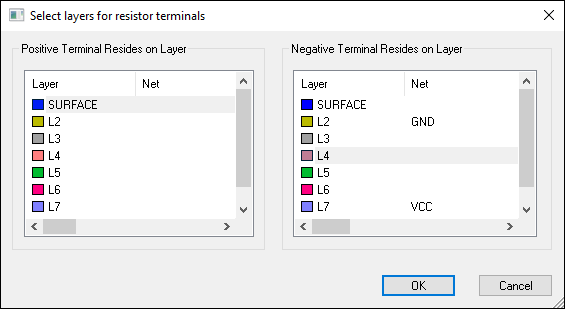
- From the Positive Terminal Resides on Layer list, select the layer for the positive end.
- From the Negative Terminal Resides on Layer list, select the layer for the negative end.
- Click OK.
- From the Name field, type a name for the resistor.
- From the Part Number field, type the manufacturer's part number.
- From the Resistance field, enter a value in Ohms.
- From the Parasitic Capacitance field, enter a value in Farads.
- From the Parasitic Inductance field, enter a value in Henries.
- Click OK.
When you finish drawing the resistor, the Select layers for resistor terminals window appears.
The Set Resistor Parameters window appears.
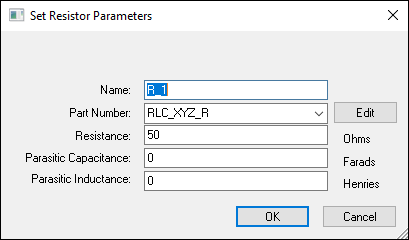
You have now assigned values to your resistor. You can also edit the parameters.