
Adding Backdrills
Unused portions of vias (known as "stubs") can create significant signal integrity disturbances. Backdrilling is a technique that removes these stubs.
To add a backdrill in SI Xplorer:
- Insert a via configuration.
- From the Via Wizard, click a port or padstack in the diagram to select it.
- Click Edit PS Instance.
The Padstack Usage and Definition window appears.
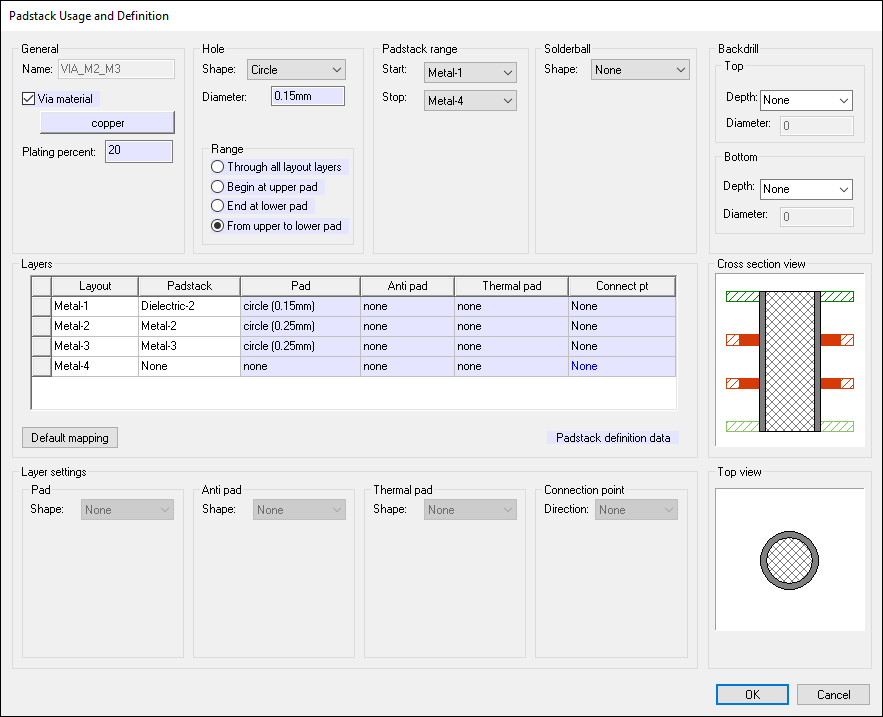
- Use the options in the Backdrill area to define a backdrill:
- Top – use the drop-down menu to select the depth of the backdrill from the top layer.
- Bottom – use the drop-down menu to select the depth of the backdrill from the bottom layer.
- Diameter – for either top or bottom, specify the backdrill's diameter.
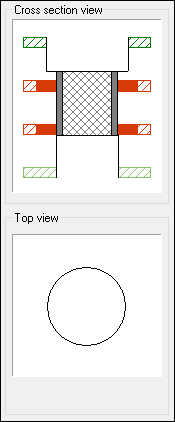
The Cross Section View and Top View areas update to display the backdrill.
- Click OK.