
Setting AC Resistance and Inductance (RL) Analysis Parameters in Q3D Extractor
Q3D Extractor's AC RL solves quasi-magnetostatic problems using either Adaptive Cross Approximation (ACA) or Multilevel Fast Multipole Method (MLFMM). Both are effective and accurate methods of solving surface integral equations discretized via Method of Moments (MoM).
- ACA is best for solving small problems, and is the default solver.
- MLFMM is more efficient in both RAM consumption and simulation time for large problems.
MLFMM is best used in applications with more than 1 million triangles. Important:
The ACA solver must be used in the following cases:
- For models with an infinite ground plane.
- For models containing magnetic materials.
- When Enhanced Accuracy in DC-to-AC Transition Region is enabled.
To set up an AC RL analysis, first add a solution setup.
Then, from the Solve Setup window:
- Select the AC RL tab.
The AC RL options display.
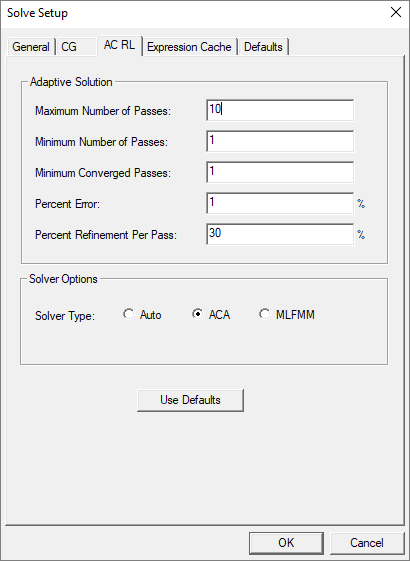
- In the Adaptive Solution area, specify values for the following:
- Maximum Number of Passes – the maximum number of mesh refinement cycles that you would like Q3D
Extractor to perform. This value is a stopping criterion for the adaptive
solution; if the maximum number of passes has been completed, the adaptive
analysis stops. If the maximum number of passes has not been completed,
the adaptive analysis continues unless convergence criteria are reached.
Important:
The size of the finite element mesh — and the amount of memory required to generate a solution — increases with each adaptive refinement of the mesh. Setting the maximum number of passes too high can result in Q3D Extractor requesting more memory than is available or taking excessive time to compute solutions.
- Minimum Number of Passes – the minimum number of mesh refinement cycles. Q3D Extractor will not stop analysis until after this number of passes has been completed.
- Minimum Converged Passes – the minimum number of passes that must meet convergence criteria before the adaptive analysis will stop.
- Percent Error – the desired solution accuracy. Smaller values produce more accurate but slower solutions; larger values produce less accurate but faster solutions.
- Percent Refinement Per Pass – the maximum growth rate, per pass. This determines how many triangles are added
at each iteration of the adaptive refinement process. The triangles with the highest error are then refined. The default value is 30%.
Note:
A growth rate lower than the maximum occurs when there are not enough high error elements to warrant adaption. This reduces memory usage without sacrificing accuracy.
Note:Magnetic conducting materials only impact resistance, not inductance since the AC solution assumes a fully developed skin effect (surface current).
- Maximum Number of Passes – the maximum number of mesh refinement cycles that you would like Q3D
Extractor to perform. This value is a stopping criterion for the adaptive
solution; if the maximum number of passes has been completed, the adaptive
analysis stops. If the maximum number of passes has not been completed,
the adaptive analysis continues unless convergence criteria are reached.
- In the Solver Options area, select one of the following:
- Auto – When selected, Q3D Extractor automatically decides whether to use ACA or MLFMM, depending on the mesh size. ACA will be automatically selected for any problems with fewer than 300,000 triangles, as well as for any designs with infinite ground, magnetic materials, or transition region solve enabled.
- ACA – Adaptive Cross Approximation.
- MLFMM – Multilevel Fast Multipole Method.
- Click OK.