Electrothermal Flow for Power Electronics
When simulating the bus bars, connectors, and PCBs of power electronics converters, most cases deal with Pulse Width Modulated (PWM) voltages and currents. In these cases, Q3D Extractor alone cannot generate DC equivalent circuits that:
- Accurately represent power losses, and
- Satisfy the current balance in accordance with Kirchhoff's first law.
Therefore, an advanced workflow is required to accurately estimate losses in bus bars, connectors, and PCBs for power electronics. There are two choices:
- Time Domain Workflow using Maxwell A-Phi solver
- Frequency Domain Workflow using Q3D Extractor or SIwave (for PCBs)
Harmonic Loss Calculation
Q3D's Harmonic Loss calculation is a post-processing field for the DC RL simulation. It is based on Parseval's Power Theorem, which states that the power of a signal is equal to the sum of square of the magnitudes of various harmonic components present in the discrete spectrum.
Power loss density is calculated for the real and imaginary parts of the net current at each frequency separately.
The skin and proximity effects on losses are not simulated directly. Instead, they are approximated by scaling the dissipated power of a net with the AC resistance value from the matrix at each frequency. This approach cannot provide high accuracy in the power loss density distribution for cases in which geometry parts with different conductivity values are combined in one net.
Frequency Domain Workflow using Q3D Extractor
For one period of power converter output frequency, perform the following:
- Set up a Q3D Extractor design. Ensure that DC RL, AC RL, and Save Fields are enabled.
- Add a Frequency Sweep
to the solution setup. Ensure that the type is Interpolating, and that the frequency points cover the entire range of interest, including DC point. Tip:
For higher accuracy of the power loss density distribution, consider applying additional mesh operations (Inside Selection > Length-Based).
- Create Design Datasets for frequency-dependent real and imaginary currents at each source either manually or by performing the following steps:
- Create a Circuit design, for which the Q3D model is a part. If using Ansys Circuit or Ansys Twin Builder, you can include the Q3D parasitic model using Dynamic Link.
- Run a Circuit Transient analysis.
- After Transient simulation reaches steady state for one period of fundamental frequency, record the current values corresponding to each source in the Q3D Extractor model.
- Perform FFT on all recorded currents, plotting real and imaginary parts separately.
- Export real and imaginary currents vs. frequency for all Q3D sources as datasets, ensuring that the frequency points are the same in all datasets.
- In the Q3D Extractor design, import the datasets as Design Datasets.
Note:Optionally, you can enable and use the beta option Push Excitations to Q3D from Circuit.
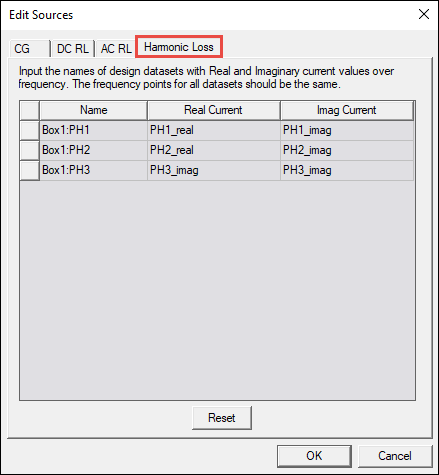
- In the Edit Sources window, select the Harmonic Loss tab and set real and imaginary current values for the corresponding sources.
- Run the Q3D simulation.
- Select the geometry and right-click Field Overlays in the Project Manager. Select DC R/L Fields > Harmonic_Loss_Density. Total loss value can be calculated using the Fields Calculator.
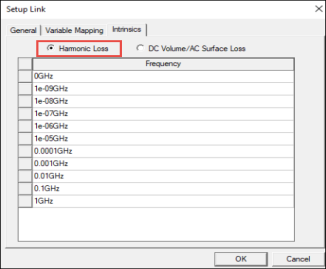
- If coupling with a thermal solver inside Electronics Desktop (i.e., EM Loss link to Icepak), open the Setup Link dialog box and ensure that Harmonic Loss is selected on the Intrinsics tab before analysis.