Export Grid Max Field Data
The Maxwell 3D > Export Layout Field Data > Export Grid Max Field Data function calculates the maximum field value on the top/ bottom face of layout layers within a user-defined grid in the XY plane. It can calculate the maximum field value for Mag_B, Mag_H, or Mag_J.
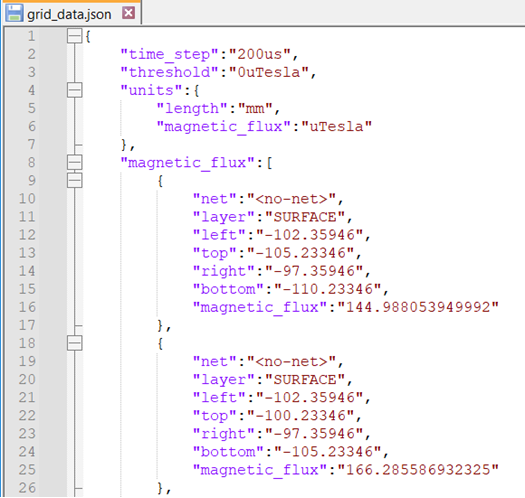
After the window is set up and the user clicks OK, Maxwell exports the data to the specified file. The output data of each grid cell, layer, and net combination contains
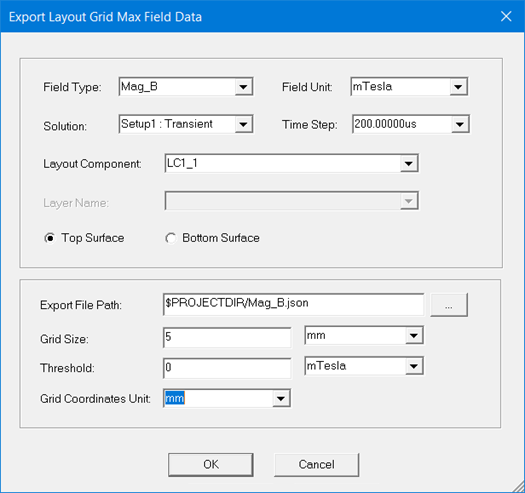
- the maximum field value of the top/bottom surface in each grid (in user-specified unit),
- the net and layer names,
- the top Y, bottom Y, left X, and right X value (as determined with user-defined length unit).
To set up the Export Grid Max Field Data window, configure the following settings:
- Click the drop-down arrow beside Field Type, and select one of the following: Mag_B, Mag_H, or Mag_J.
- Click the drop-down arrow beside Field Unit, and select the unit for exporting data. Options include Tesla and Gauss.
- If there are multiple analysis setups in your design, you must select which setup solution you would like to use for the export. Click the drop-down arrow beside the Solution field, and select the desired solution results. If there is only one solution in the design, it will automatically display in the Solution field.
- Select the Time Step value you would like to use for the extraction. The available values are determined by transient setup in the Solve Setup window.
- From the Layout Component drop-down menu, select the layout component instance to export data from. If there is only on layout component in your design, it will be selected by default.
- For the Mag_J field only: select the layer you would like to use for the export: from the Layer Name drop-down menu, select the layer to perform the calculations on; use All_Layers for selecting all layers.
- For Mag_B and Mag_H only: select Top Surface to calculate and export data from the top face of the layer. Select Bottom Surface to calculate and export data from the bottom face of the layer.
- Specify the Export File Path and name of the exported file with the .json extension. Note that this field support macros like $PROJECTDIR; for example, $ProjectDir/Mag_B.json.
- Specify the Grid Size, which determines the length of the user-specified grid in the X, Y directions, and the measurement units for the grid size.
- Specify the Threshold of the field value, which is the minimum field value for the data to be exported. In the adjacent field, specify the units for the Threshold.
- Specify the Grid Coordinate Unit, which determines how the coordinate values are listed in the data report.
- Click OK to generate the report.
The figure that follows shows partial Mag_B results for all layers of the LC1_1 component: