
Clone Mesh Density
For Maxwell 3D rotational transient design, this meshing operation allows you to specify the clone mesh density while keeping the identical mesh in identical sub-regions. Different from Length-Based Mesh Refinement, this Clone Mesh Density mesh operation will only be applied to clone mesh. Only when clone mesh is enabled under cylindrical mesh operation, mesh will respect this mesh operation. Mesh density can be controlled while identical mesh is maintained.
To control the clone mesh density in Maxwell:
- Select the object.
- Click Maxwell > Mesh > Assign Mesh Operation > Inside Selection > Clone Mesh Density.
The Clone Mesh Density dialog box appears.
- Type a name for the mesh operation in the Name box, or accept the default name.
- To specify the radial direction density, enable the radial direction option. Type the maximum length of the element size required inside the object(s) in the Maximum element length box, and select the units. Maxwell refines the element edges inside the object(s) until they are equal to or less than this value. The default value is set to 10% of the maximum dimension of the bounding box of the model.
- To specify the axial direction density, enable the axial direction option. Enter the Number of layers to be added. Maxwell refines the mesh in axial direction inside the object(s) until the number of mesh layers in the axial direction are equal to or more than this value.
- Click OK. You need to specify mesh density in at least one direction to enable this mesh operation.
When the clone mesh is generated, the refinement criteria you specified are used. You can specify different maximum length of the element size on different objects. Note that identical density setting should be applied to identical objects to ensure the specified density to be applied on those objects.
You can also specify different axial direction number of layers on different objects. Note that the number of layers in axial direction are maintained separately inside and outside of the band. If objects share a same region in axial direction on the same side of the band, the mesh refinement will refines until the layer thickness equal or smaller than the smallest average layer thickness in this region.
The Clone Mesh Density can not be applied to band object. To control the element size on band, use the Band Mapping Angle setting.
Clone Mesh Density can only be respected in clone mesh region. Mesh density in regions that are skewed or not clonable may not be controlled as precise as it is in clone region.
Original clone mesh without Clone Mesh Density mesh operation:
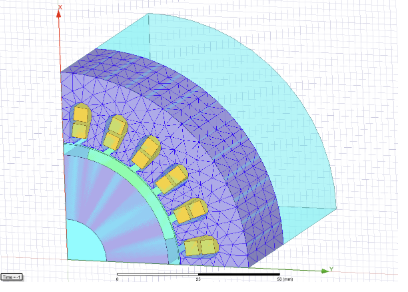
Clone mesh with Clone Mesh Density mesh operation on Stator. Radial direction mesh is refined according to maximum element length specification:
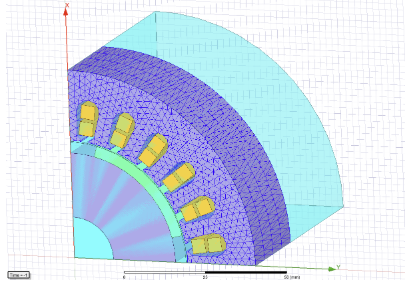
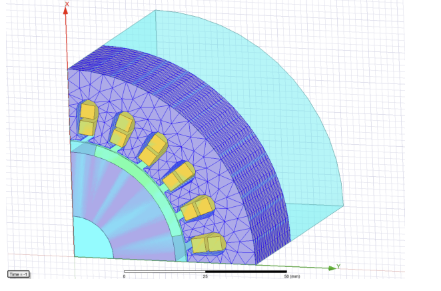
Clone mesh with Clone Mesh Density mesh operation on Stator . Axial direction mesh is refined according to number of layers specification:
Related Topics
Assigning Length-Based Mesh Refinement on Object Faces
Generating the Mesh without Solving
Technical Notes: Length-Based Mesh Refinement
Technical Notes: The Mesh Generation Process
Technical Notes: Seeding the Mesh
Technical Notes: Guidelines for Seeding the Mesh