Assigning Mesh Operations
Multi-level meshing enables local refinement from a starting Cartesian mesh generated using the max sizes you specified. Multi-level meshing is useful if you have a large variation of length scales in your model. The refinement can be controlled such that the initial mesh is refined in an area where the mesh needs to be finer in order to resolve some geometrical features or gaps. This will significantly reduce the overall mesh count while providing adequate mesh resolution where it is needed. Multi-level meshing applies to 2D and 3D cut cell meshing.
During 3D cut cell meshing, the mesh is refined based on min and max level and size function requirements. If the per-object meshing level is specified for an object, the mesh around that object will be refined to that level, even if the per object meshing level is greater than the max level you specified. This enables you to localize control of the mesh refinement process whereas the use of size functions would have refined the mesh everywhere in your model where the size requirement is not met.
To specify per-object mesh levels, assign local mesh parameters, or reuse existing mesh, you must assign a mesh operation to geometry in the 3D Modeler window.
- Enter the desired selection mode (object, face, or edge).
- In the 3D Modeler window or the history tree, right-click the geometry, and select Assign Mesh Operation.
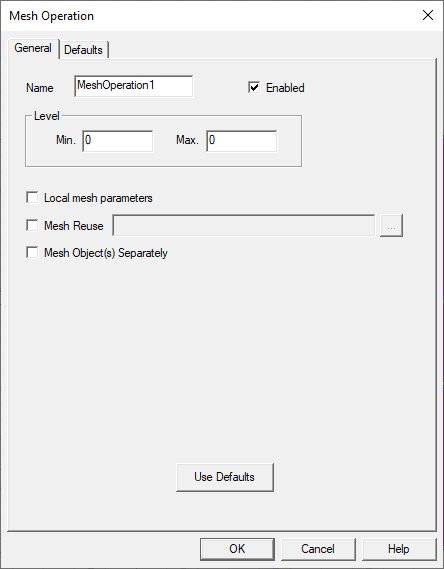
- Enter a Name for the mesh operation.
- Under Level, enter Min. and Max. mesh levels.
- If needed, select Local mesh parameters. On the Local Mesh Parameter tab, define the local mesh settings for the selected object, face, or edge. See Local Mesh Parameters for more information.
- If needed, select Mesh Reuse and click the [...] button to open the Select Mesh File dialog box. Navigate to and select the mesh file to reuse in your Icepak design. See Mesh Reuse for more information.
- If the selected object is created in a relative coordinate system, select Mesh Object(s) Separately to generate mesh that is aligned with the relative coordinate system.
- Click OK. The mesh operation is listed under Mesh > MeshOperation in the Project Manager.