
High Performance Computing in Icepak
The Ansys Electronics Desktop has different options and settings to improve the efficiency of various Icepak processes.
- Pre/post processing option
- High Performance Computing (HPC) tasks
- HPC cores
Pre/post Processing Option
The Desktop Performance settings in the General Options contains the Pre/post processing option (see General Options: Desktop Performance). For Icepak designs, the number of processors specified affects the following Icepak processes:
- Viewing the mesh with the Mesh Viewer
- Mesh quality calculations with the Mesh Viewer
- Plotting field overlay data
- Field summary calculations
- Fields calculator calculations
HPC Tasks
When configuring HPC settings for distributed analysis (see Editing Distributed Machine Configurations), the number of tasks you specify affects the following Icepak processes:
- Meshing a design with multiple mesh regions
- Solver initialization
- Nominal solve (Ansys Fluent process)
- Parametric setup analysis
Meshing
When an Icepak design contains multiple mesh regions, specify multiple tasks to mesh multiple regions concurrently.
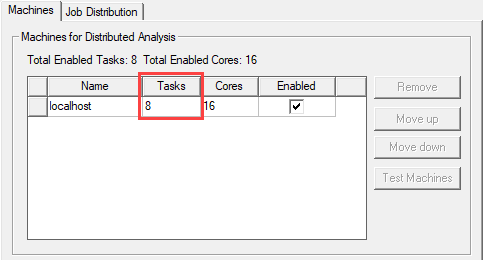
When a design contains fewer than or equal to the number of tasks specified, all mesh regions are meshed concurrently. For example, if a design contains 10 mesh regions and 12 tasks are specified, all 10 mesh regions are meshed concurrently.
When a design contains more mesh regions than tasks specified, the number of mesh regions meshed concurrently is equal to the number of tasks specified. For example, if a design contains 10 mesh regions and 8 tasks are specified, 8 mesh regions are meshed concurrently, and the remaining 2 mesh regions will be meshed concurrently as computing resources become available.
The following table contains more examples of task usage for Icepak meshing scenarios.
| Tasks | Mesh Regions | Concurrently Meshed Regions |
|---|---|---|
| 4 | 8 | 4 |
| 16 | 12 | 12 |
Parametric Analysis
One Level Distribution
When a parametric setup contains multiple variables and, therefore, multiple variations of a simulation, one level distribution uses the specified number of tasks to solve multiple variations concurrently.
When a parametric setup contains fewer variations than tasks specified, the number of variations solved concurrently is equal to the number of tasks specified. For example, if a parametric setup contains 10 variations and 12 tasks are specified, all 10 variations are solved concurrently.
When a parametric setup contains more variations than tasks specified, the number of variations solved concurrently is equal to the number of tasks specified. For example, if a parametric setup contains 16 variations and 12 tasks are specified, 12 variations are solved concurrently, and the remaining 4 variations will be solved concurrently as computing resources become available.
The following table contains more examples of task usage for Icepak one level parametric analysis scenarios.
| Variations | Tasks | Concurrent Runs | Tasks Per Concurrent Run |
|---|---|---|---|
| 10 | 8 | 8 | 1 |
| 5 | 10 | 5 | 1 |
| 16 | 4 | 4 | 1 |
| 4 | 16 | 4 | 1 |
Two Level Distribution
When you enable two level distribution for a parametric setup, specify a number of distributed solutions (variations) at the first level. Level two distribution uses the number of distributed solutions to solve multiple variations concurrently.
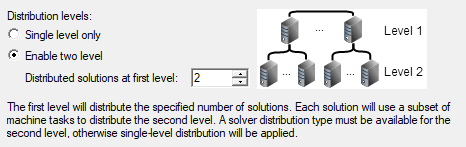
The tasks specified are divided equally among the distributed solutions. For example, if a parametric setup contains 10 variations and 2 distributed solutions are specified, 2 variations are solved concurrently. In this scenario, if 8 tasks are specified, 4 tasks are used per variation.
The following table contains more examples of task usage for Icepak two level parametric analysis scenarios.
| Variations | Tasks | Distributions at First Level | Concurrent Runs | Tasks Per Concurrent Run |
|---|---|---|---|---|
| 10 | 8 | 2 | 2 | 4 |
| 5 | 12 | 4 | 4 | 3 |
| 16 | 4 | 2 | 2 | 2 |
| 4 | 16 | 4 | 4 | 4 |
COM Engine CPU Usage
High performance computing in the Electronics Desktop impacts your overall CPU usage. The number of tasks and cores specified determines the maximum percentage of CPU usage.
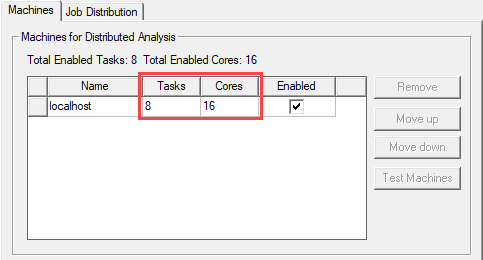
The following table contains examples of maximum COM engine CPU usage scenarios.
| Tasks | Cores | Max CPU Usage |
|---|---|---|
| 2 | 2 | 13.1% |
| 2 | 4 | 25.6% |
| 4 | 4 | 26% |
| 8 | 8 | 35% |
| 8 | 16 | 55% |