
Specifying a Logarithmic Spaced Frequency Sweep
For Discrete sweeps.
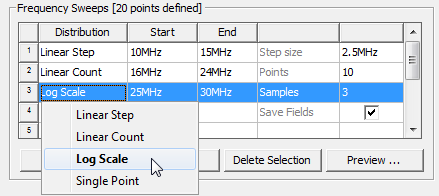
- In the Edit
Sweep dialog box, click LogScale
in the Type drop-down menu.
- In the Start text box, type the starting frequency of the frequency sweep.
For Fast and Interpolating sweeps, setting the initial value to 0 enables the DC Extrapolation option.
- In the End text box, type the ending frequency of the frequency sweep.
- In the Samples text box, specify the number of frequency points to sample.
HFSS assigns the sampled points using intervals based on a logarithmic scale.
To view a table of the frequencies and count, click the Display button. If the list of frequencies is longer than the visible display, you can use a scroll bar to view the list to the end of the count.
- Select Save Fields (All Frequencies) if you want to save the calculated 3D field solutions associated with all port modes at the chosen frequencies.
For Discrete sweeps, HFSS always solves the frequencies from highest to lowest.