
Special padstack definition layer names (Start, Stop, and Default) are provided to allow you some control over default mapping of the definition layers to stackup layers when the padstack is placed into a layout as a via or pin. Using these special layer names is optional. When a via or pin is placed, a default mapping occurs in the following order:
- Any layout stackup signal layer before the start layer of the padstack or after the stop layer of the padstack does not get mapped to any definition layer.
- Any layout stackup signal layer whose name matches a definition layer name is mapped to that definition layer.
- If the start layer of the padstack is not yet mapped, and there is a definition layer named "Start", they are mapped.
- If the stop layer of the padstack is not yet mapped, and there is a definition layer named "Stop", they are mapped.
- If there is a definition layer named "Default", any remaining layout stackup signal layers are mapped to it.
- If there are remaining layout stackup signal layers, they are mapped (in order) to the remaining definition layers.
- Any layout stackup signal layers that are unmapped, remain that way.
When the Padstack Usage and Definition window is closed by clicking OK, you are given a choice of how to apply the definition changes that are made; the Apply Padstack Definition Changes window opens only if changes are made to the padstack definition (not all changes to the Padstack Usage and Definition window change the padstack definition).
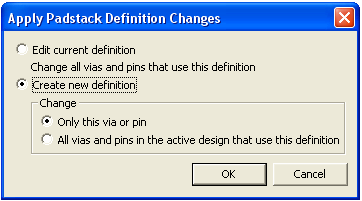
- Edit current definition — changes all vias and pins that use this definition
- Create new definition – allows you select whether the changes apply to Only this via or pin or whether the changes apply to All vias and pins in the active design that use this definition of the original padstack.